Azure Portal and Azure Local Host Integration Troubleshooting Guide
In this blog post, I’ll walk you through how to troubleshoot Azure Local Cluster issues that occur when changes made from the Azure portal fail with errors indicating that the agent cannot complete the requested operations. Additionally, if you’re facing problems with an Azure Arc Resource Bridge showing as offline, this guide will help you diagnose the issue and bring your cluster back online.
Recently, I ran into a problem, where on my Azure Local environment instructions such as start VM, create VM and stop and other operations were not carried out on Azure Local hosts.
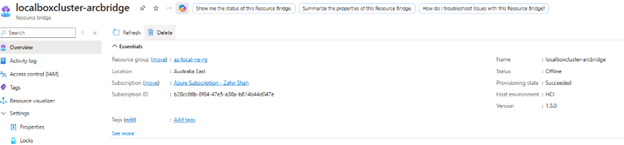
After so much try with services start and restart and other tricks didn’t add any benefit, and I was not able to find why Azure resource bridge resource is not coming online.
Then finally, I came to know that, I had deleted the resource bridge VM which is similar name to AKS control plane node, and after that, my resource bridge resource is not coming online, and due to this my operations on Azure Local hosts are not working.
So when you ran into such issue, follow the below outline steps to bring the cluster back online:
- First find if you have in the failover manager any VM with the below name:
- If you had deleted it mistakenly, then go to Hyper-V manager and find it, when you delete from failover cluster it doesn’t delete from Hyper-V manager, which is big help in this case.
- Now add back this VM in the failover cluster from configure cluster role and start he VM.
- When you have this VM back, then go to the Azure Local Host, where this VM is running, you can run below commands in PowerShell to check the health of Resource Bridge VM if all is good inside.
Note: You cannot login inside the resource bridge VM as it is hardened by Microsoft and no logins are allowed. - First we will run the below command to see how many IP addresses are assigned if it has two IP addresses, then you are all good.

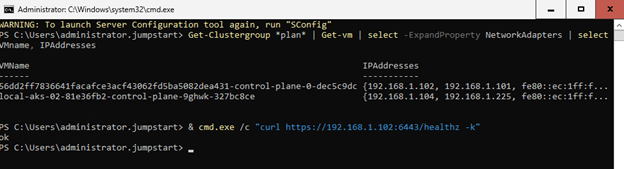
- Secondly, You check against the resource bridge IP address command to see the health status, if it return OK then everything is back.
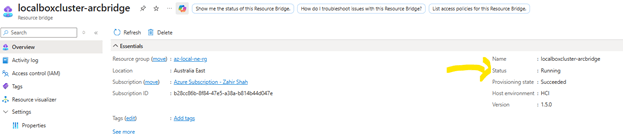
- Now from the time you brought the machine back online, in a minute or two you would see that resource bridge status would show online.
After you perform the above mentioned operation, you would see resource bridge is online:
Cheers!
Zahir Hussain Shah
 Azure Hybrid & Cloud Migration Blog
Leave a comment