In this blog post, I share my recent experience setting up and testing an Azure Local lab. The focus was on hands-on evaluation, understanding how Azure Local actually works, what it does well, and what needs planning when designing a production environment. The insights here are based on testing core capabilities across compute, networking, storage, identity, security, monitoring, Kubernetes, and day‑to‑day operations.
Lab Environment
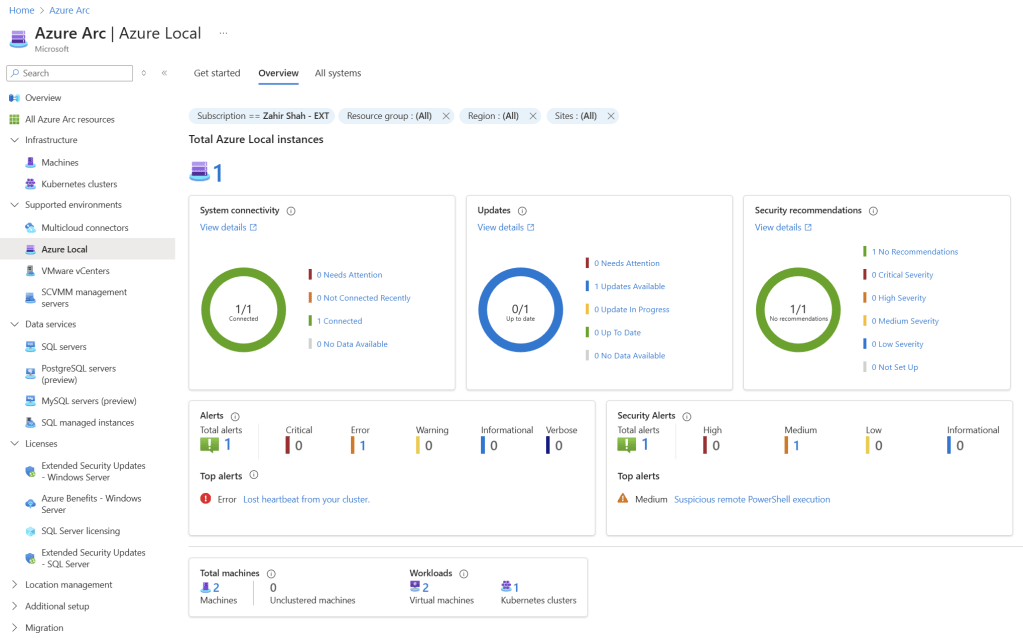
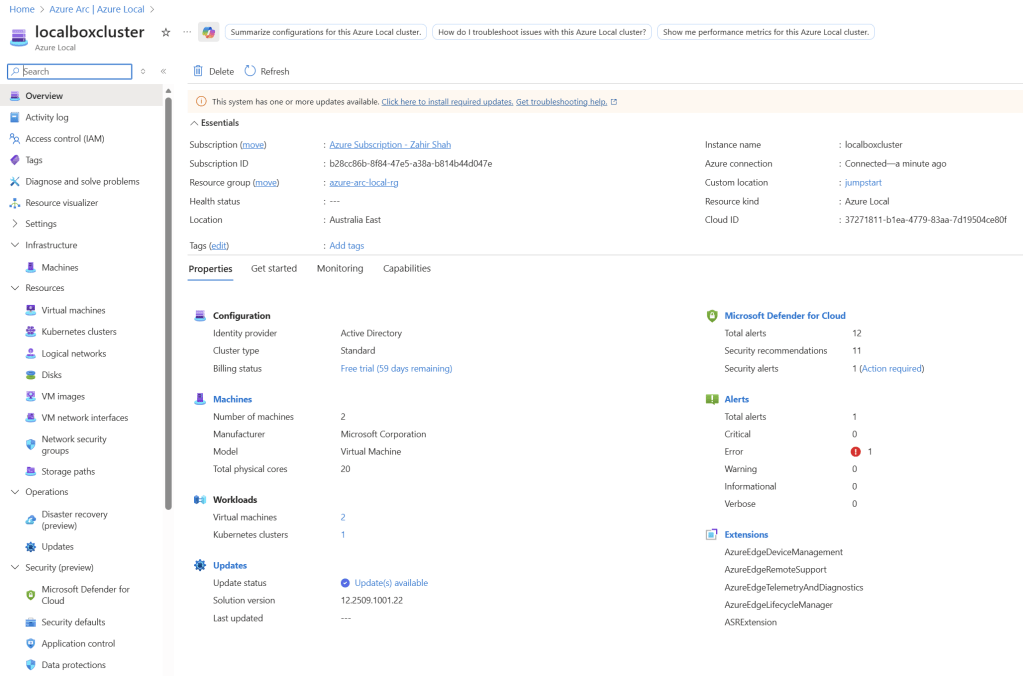
In this lab, I set up a two-node Azure Local cluster using Azure Jumpstart Localbox. A similar lab environment can also be deployed on Hyper‑V. With this two‑node Azure Local setup, I was able to simulate nearly all Azure Local capabilities, including virtual machines, NSGs, images, logical networks, Arc‑enabled Kubernetes, monitoring, disaster recovery, security, and more.
Each section is explained in detail, covering what to expect along with key tips and tricks to help everything work smoothly, making your lab and learning experience significantly easier.

What Is Azure Local?
Azure Local is Microsoft’s hybrid infrastructure platform that brings Azure‑native management, governance, security, and monitoring to workloads running locally. It allows organizations to run virtual machines, containers, and Kubernetes workloads on‑premises while managing them consistently using Azure services through Azure Arc.
Why I Built This Lab
I spent dedicated time evaluating Azure Local by building a complete hands‑on lab and testing the service across multiple dimensions — compute, networking, storage, identity, security, monitoring, Kubernetes, and disaster recovery.
It is a practical field guide based on real testing:
- What works well
- How Azure Local behaves differently from classic Hyper‑V
- Where Azure Portal ends and local cluster management begins
- What to plan for before production
It should help:
- Engineers evaluating Azure Local
- Architects planning hybrid strategy
- Anyone who wants to set up an Azure Local lab quickly
Azure Local Lab Setup Using Microsoft Jumpstart (Localbox)
The lab was deployed using Microsoft Jumpstart – Azure Local (Localbox), which is the fastest and most reliable way to evaluate Azure Local without building everything manually.
🔹 Why Jumpstart Localbox?
- Pre‑built Azure Local environment
- Includes Azure Arc integration
- Ideal for POC, evaluation, and training
- Saves days of setup effort
🔹 Getting Started Resource
👉 Microsoft Jumpstart – Azure Localbox
https://jumpstart.azure.com/azure_jumpstart_localbox/getting_started
Identity, RBAC & IAM Observations
Azure RBAC is consistently enforced across:
- Azure Local instances
- Virtual Machines
- Azure Arc‑enabled Kubernetes clusters
- ARM‑managed resources
Key findings:
- RBAC controls read, write, and lifecycle actions
- VM creation and management respect Azure roles
- Separation of duties aligns with Azure governance best practices
- Centralized access model reduces local permission sprawl
✅ Production Recommendation:
Use Azure RBAC as the primary access control mechanism and keep local cluster permissions for break‑glass scenarios only.
Virtual Machine Creation & Guest Management
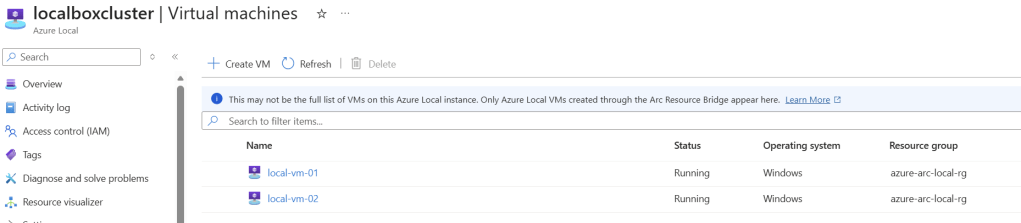
During testing, VM lifecycle behavior closely followed Azure VM patterns:
- VM creation via Azure Portal supports:
- Node targeting or automatic placement
- Multiple NICs
- Data disks with storage tier selection
- VMs joined to Active Directory at creation (Jumpstart DC)
- VMs onboard automatically to Azure Arc
- Changing vCPU or memory works but requires reboot
- Guest management extensions enabled and functional
- Security and advisory recommendations visible in Azure
🚫 Important Limitation:
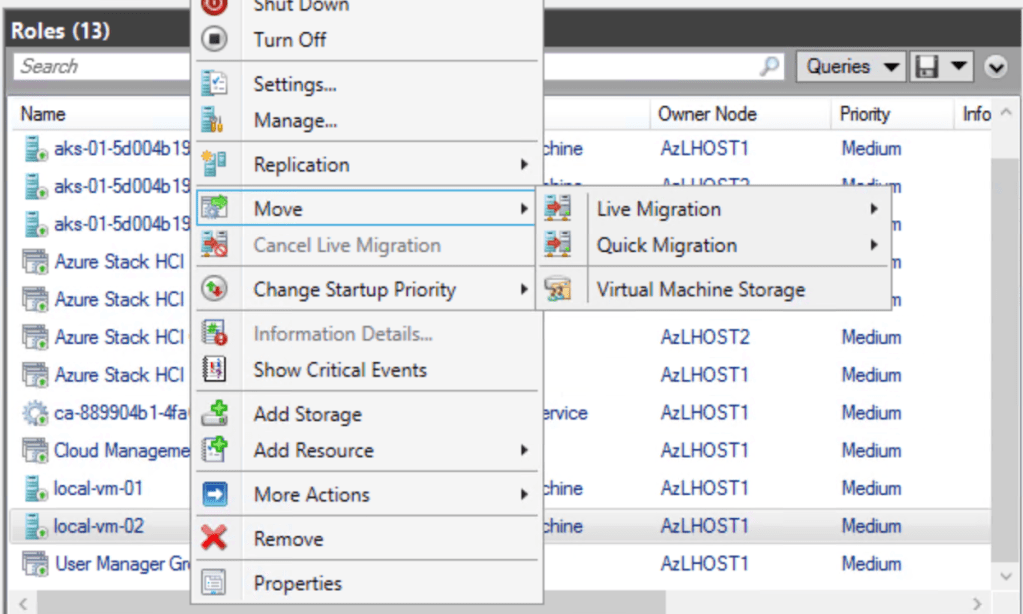
VMs cannot be moved from Azure Portal back to the local host.
Host‑to‑host migration uses Failover Clustering tools.
Monitoring with Azure Monitor
Azure Local integrates cleanly with Azure Monitor through Azure Arc:
- CPU, RAM, and Disk metrics available
- Data Collection Rules (DCR) and Endpoints (DCE) enabled
- VM Insights deployed automatically using Azure Policy
✅ Production Recommendation:
- Use Azure Policy to enforce:
- VM Insights
- DCR / DCE configuration
- Centralize dashboards for cloud and local workloads
Security & Defender Integration
Security posture is one of Azure Local’s strongest advantages:
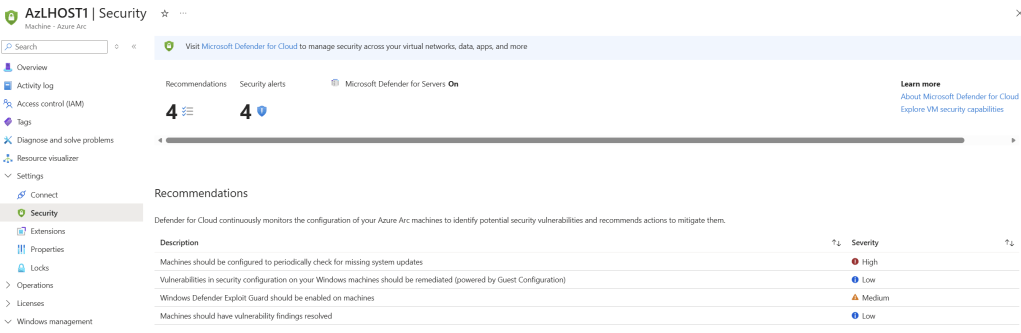
- Security and defender coverage is for both Azure Local host machines and guest machine using Azure Arc agent.
- Azure Arc agent installed on all VMs
- VMs enrolled in Microsoft Defender for Cloud
- MDE for Windows and Linux supported
- Security recommendations visible at VM and subscription level
✅ Best Practice:
Block production VM deployments unless Defender onboarding succeeds.
VM Movement & Operational Boundaries
- Azure Portal handles lifecycle, policies, security, and monitoring
- VM movement between hosts is not portal‑driven
- Use:
- Failover Cluster Manager
- Live Migration
- Quick Migration (Hyper‑V style)
✅ Key Insight:
Azure Local intentionally separates governance (Azure) from infrastructure control (local tools).
Logical Networking & VLAN Design
Logical networking is critical for production readiness:
- Hyper‑V virtual switches use VLAN trunking
- Logical networks define:
- VLAN tags
- Gateway
- Routing behavior
- Jumpstart lab runs flat by default
Lab Example:
- Subnet: 192.168.1.0/24
- Gateway: 192.168.1.1
- DNS / DC: 192.168.1.254
- Logical network bound to converged switch
✅ Production Recommendation:
Always define VLAN tags in logical networks — avoid flat networking.
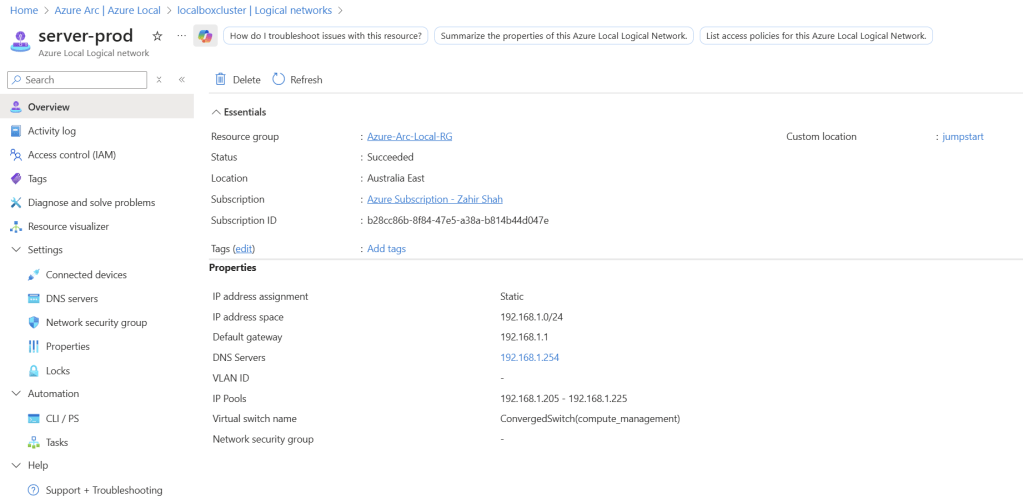
Image Management
- Images created from Azure Marketplace sources
- Images copied locally and reused
- Microsoft blocks duplicate universal names
(e.g., Windows Server 2025 Standard)
✅ Tip:
Use unique image naming conventions to avoid deployment failures.

Network Security Groups (NSGs)
- NSGs behave exactly like Azure IaaS VMs
- Attach at VM NIC level
- Supports deny‑by‑default security model
✅ Best Practice:
Manage NSGs centrally via Azure Policy.
Storage Paths & Workload Tiering
Storage paths behave like:
- Cluster Shared Volumes (CSV)
Lab findings:
- Multiple storage paths available
- Workloads can be tiered by disk type
- Avoid mixing high‑IO and capacity workloads
✅ Production Recommendation:
Segment workloads by performance requirements.
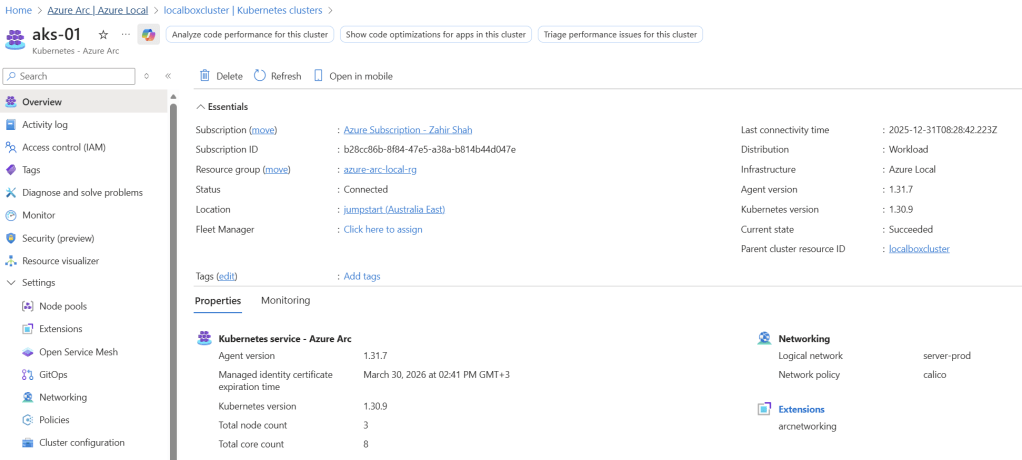
Arc‑Enabled Kubernetes (AKS on Azure Local)
Kubernetes management felt familiar and consistent:
- AKS connected via Arc proxy
- Standard kubectl operations work
Shell – key important commands to connect Kubernetes deployed within Azure Local:
kubectl get nodes
kubectl get ns
kubectl get pods -A
Show more lines
✅ Recommendation:
Apply Azure RBAC and Azure Monitor policies for Kubernetes early.
Windows Admin Center
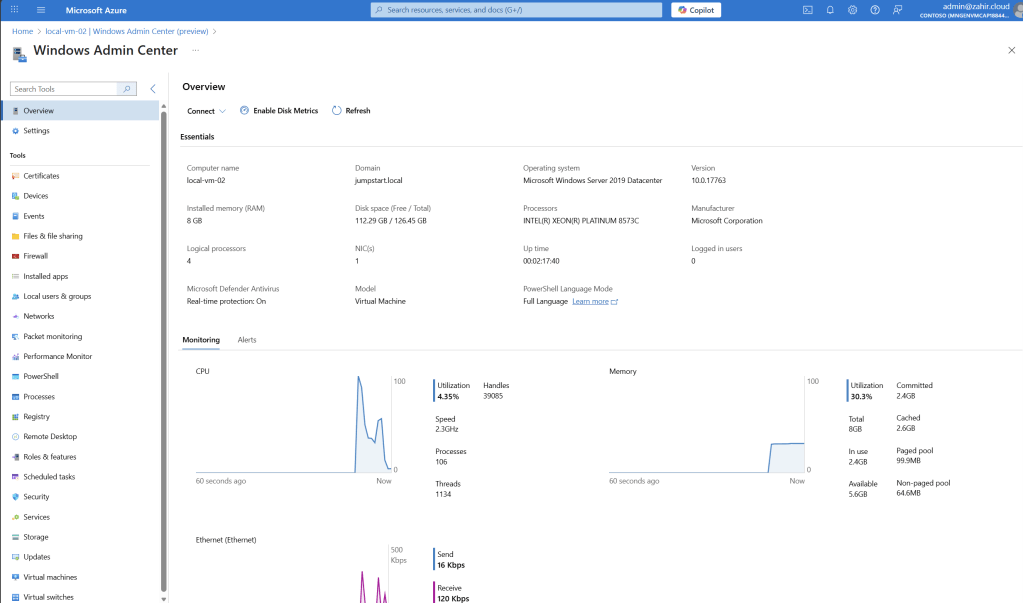
You can use Windows Admin Center to manage Azure Local virtual machines and also Azure Local Host, which gives you full flexibility to manage all aspect of server OS and other key features.
Disaster Recovery with Azure Site Recovery
DR testing included:
- Recovery Services Vault creation
- Hyper‑V site definition
- Replication policies
- ASR extension installation on hosts
✅ Key Advice:
Test failover before production. DR should not be an afterthought.
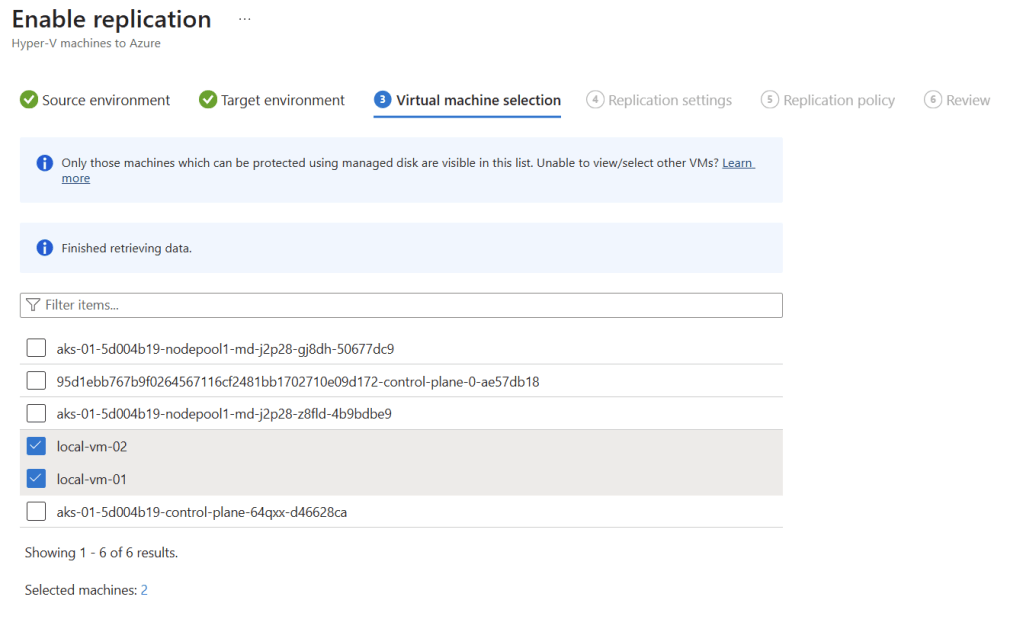
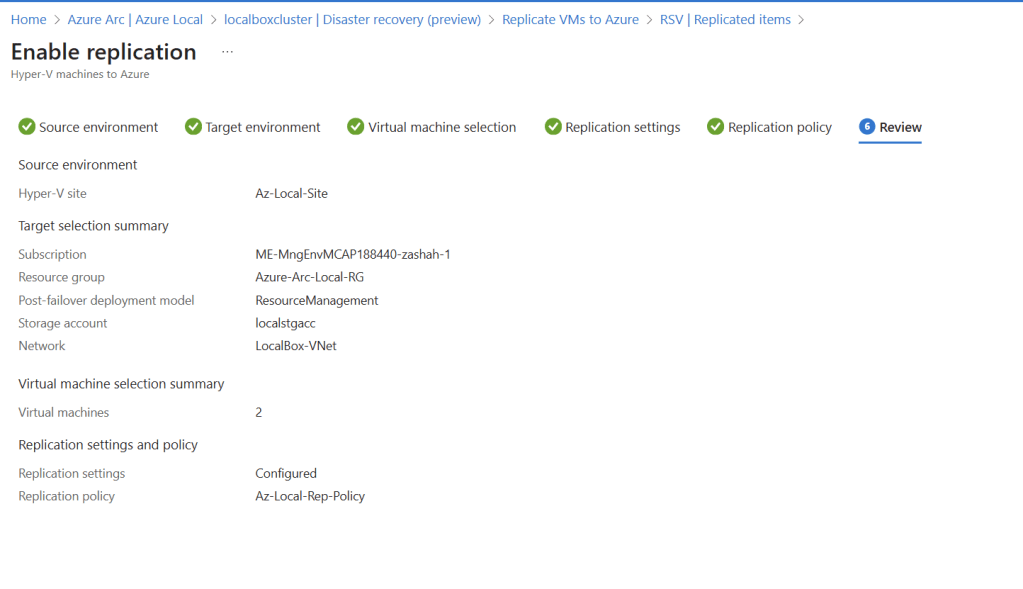
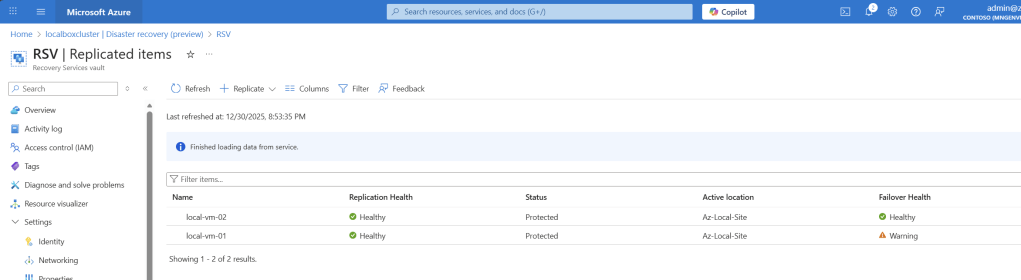
You can see in the below section that, following VMs from Azure Local have been successfully setup for disaster recovery into Azure Recovery Services Vault, and in-case of an actual disaster, these machines can be bring online from Azure:
Final Thoughts
Azure Local delivers true hybrid consistency — not just management visibility.
What stood out most:
- Azure‑native security and governance
- Clear separation of cloud vs physical operations
- Familiar tooling for infrastructure teams
- Strong fit for organizations modernizing on‑prem workloads
If you are evaluating Azure Local:
- Use Jumpstart Localbox
- Test operational boundaries
- Design networking and security upfront
This approach will save time and prevent surprises later.
 Azure Hybrid & Cloud Migration Blog
Leave a comment