There are times when unavailability of full backup of Exchange information store put administrator into trouble situation because of the disappearing free disk space for Exchange mailbox database LUNs. This situation may arise due to the fact that either the backup software has some issues and failing to truncate the logs, or it is Exchange Server which has some issues which is not allowing the backup software to gracefully purge the logs. Either of the both situation there is a fair amount of risk that unavailability of free disk space would dismount the databases available on the affected LUN.
As a best practice Exchange Admin should always need to keep an open eye on the growing storage side, and if possible should ask the backup team to provide status report of all Exchange backup jobs.
Problem:
In this blog post we will talk about two situation, in the first situation Exchange DAG mailbox database full backups are not happening or taking long time and eventually fails. In the second situation the backup jogs are completing late but fails to truncate the Exchange mailbox database logs.
Cause:
A part from other general backup slowness and issues related to VSS backups (e.g. free disk space, network availability, vss writer state), there are times when Exchange server come and stands in between as a cause for not allowing the backup software to gracefully purge the logs. Most of the times it is because of the bad Exchange mailbox database log stream. Now let me elaborate it, meaning of bad mailbox database log stream that due to some reason (antivirus / disk IO) while writing the Exchange database logs there are some issues come in between which disturbed the continuity of mailbox database logs.
Solution:
To ensure that we are having the similar problem as defined as cause above, we will follow the steps outlined down in order to verify and also to fix the problem.
- Identify if the log stream have any issues using ESEUTIL /ML E0x (replace x with your mailbox database log stream number) (Note : run it from the logs folder from EMS or a command prompt)
Note: If there are any logs you see with errors then it is simply tell you that you have log steam issue, if your log stream is fine without any error then we will see further steps to forcefully purge the logs.
- Dismount the active copy of the DBs.
- Dump the database header to make sure it’s in clean shutdown using ESEutil
a- Open RUN window
b- Browse to DB path on the local drive .
c- Type ESEUTIL /MH databasefilename.edb
d- Verify that the DB is in cleanshutdown
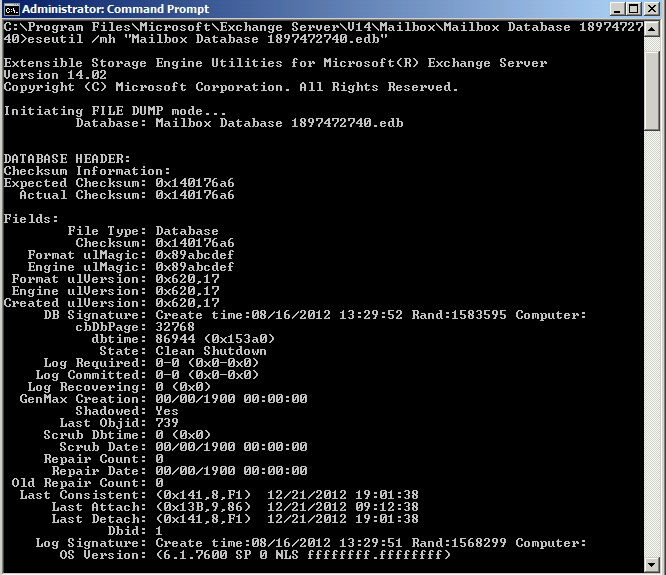
6- Move the log files ( .log) from the logs folder to alternate location ( Do this on all mailbox servers that have a copy from the DBs)
Note : Don’t delete the logs directly until the DBs are safely mounted again later on .
7- Mount the DB and make sure again the DB copies are healthy .
8 – Take backup .
Now if you will use your backup software to take another full back up, you would see that backup job will get completed normally and will purge the logs. But if it is unable to purge the logs, then we have to conclude that either it is backup software issue or something else. For verifying and separating out failure domain, we will use Windows Server Shadow Copy utility to take the full backup of Exchange Server just to simulate the log truncation using Exchange VSS writer. If this gets succeeded then we can see that this is only backup software has issues for truncating the logs.
For backing up Exchange mailbox database and simulating log truncation you can read a MS Exchange Team Blog article explaining it step by step.
I look forward to hear from you as comment on this blog post.
Cheers!
 Azure Hybrid & Cloud Migration Blog