Required Forefront Identity Manager 2010 Configuration for Microsoft Exchange 2010 Management Agent
When you have Exchange 2010, some changes are required on FIM server, AD Management Agent, and on Exchange Synchronization rule.
FIM Server Requirements:
PowerShell v2.0 for the execution of remote PowerShell CMDlets.
Management Agent Requirement:
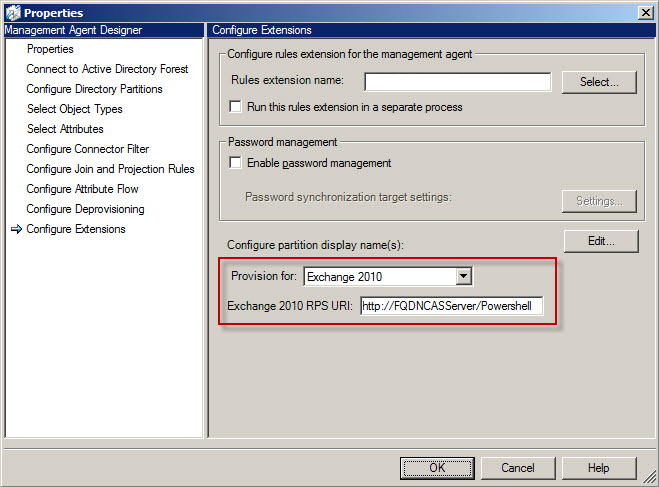
On configure extensions page, configure the MA to provision for Exchange 2010, and supply the RPS (Remote Power Shell) URI as below:
Synchronization Rule Requirement:
On the Exchange Synchronization rule, change the homeMDB attribute as per Exchange 2010 requirements (in Exchange 2007, this attribute contain the exchange server name, in Exchange 2010 the server name is in different attribute) example:
1- Exchange 2010 homeMDB : CN=Mailbox Database 1627792968,CN=Databases,CN=Exchange Administrative Group (FYDIBOHF23SPDLT),CN=Administrative Groups,CN=MAIL-ORG,CN=Microsoft Exchange,CN=Services,CN=Configuration,DC=CONTOSO,DC=LAB
2- Exchange 2007 CN= Mailbox Database,CN=First Storage Group,CN=InformationStore,CN=RFSRWDC1,CN=Servers,CN=Exchange Administrative Group (FYDIBOHF23SPDLT),CN=Administrative Groups,CN=MAIL-ORG,CN=Microsoft Exchange,CN=Services,CN=Configuration,DC=CONTOSO,DC=LAB
You should use the format in 1.
Since server name is removed from homeMDB, A NEW ATTRIBUTE should be ADDED to the Exchange sync rule:
msExchHomeServerName (e.g. /o=MAIL-ORG/ou=Exchange Administrative Group (FYDIBOHF23SPDLT)/cn=Configuration/cn=Servers/cn=RFSRWDC1)
also one more attribute, it is recommended to add it (constant for all usres):
msExchRBACPolicyLink, with this value (change it as per domain): CN=Default Role Assignment Policy,CN=Policies,CN=RBAC,CN=MAIL,CN=Microsoft Exchange,CN=Services,CN=Configuration,DC=CORP,DC=CONTOSO,DC=COM
For further information you can check the following links:
http://technet.microsoft.com/en-us/magazine/ff472471.aspx
http://setspn.blogspot.com/2010/08/fim-2010-exchange-2010-mailbox.html
Cheers;
 Azure Hybrid & Cloud Migration Blog
Leave a comment