Tag: Active Sync Transitioning from Exchange 2007 to Exchange 2010 | Iphone 4 is not working after migrating User from Exchange 2007 to Exchange 2010
Solution: Active Sync Users are not able to connect Exchange 2010 CAS Active Sync after Migrating from Exchange 2007 CAS Active Sync
Problem Statement:
Recently, I faced this problem, when one of my user who was configured for Active Sync for Exchange 2007 CAS EAS, and was working fine, but the moment we moved these accounts to Exchange 2010, users those who have configured their smartphones for Active Sync for mailboxes on Exchange 2007, are not able to connect to Exchange 2010, and all those new users which you create on Exchange 2010 are able to connect to Exchange 2010 CAS Active Sync, so what is the mystery here ???
It is also noticed that this issue occurs specially for those users, who are member of Privilege Groups, such as Domain Admins.
Symptoms:
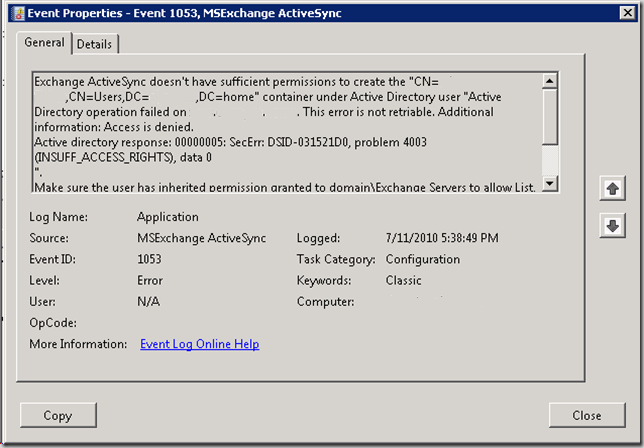
After moving user from Exchange 2007 to Exchange 2010, and you try configure user IPHONE or any other smartphone Active Sync profile, user will receive error “Cannot connect to Server”, and on Exchange 2010 CAS Server, you will get below events log for this user, as:
Cause:
As I stated above in the problem statement section that mostly this problem happens with users those who are member of Domain Admins and other builtIn Administrative Groups, so what exactly stop the ActiveSync for working with these account after migrating from Exchange 2007 to Exchange 2010 is that, since these users are part of Domain Admins groups, so by default Active Directory prevent making changes for these account with the help of SDAdminHolder account and blocks inheritance from parents objects, so when you move user mailbox from Exchange 2007 to Exchange 2010, and Exchange 2010 tries to write new values for your user account in Active Directory, so SDAdminHolder prevent Exchange 2010 from write or update the user values in Active Directory, and therefore user faces problem when try to configure his Iphone or any other smartphone device for Active Sync after getting migrated from Exchange 2010.
Solution:
Follow the below steps to fix your Active Sync issue for Users who got migrated from Exchange 2007 to Exchange 2010.1) Open Active Directory User and Computers Snap-in
2) Browse user who are facing this problem and take user properties
3) User Properties
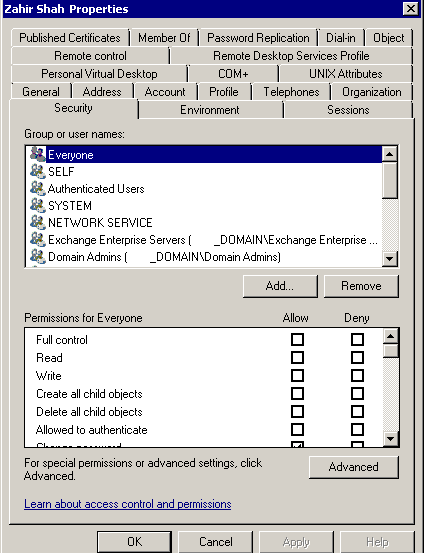
4) Click on Security Tab on the User properties area and click on Advance button.
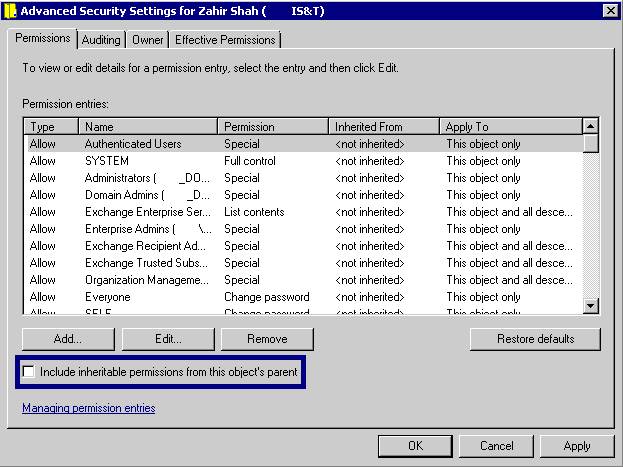
5) In the Advance Security area of User account properties, you will click on “Include Inheritable permissions from this object’s parent”.
By checking “Include Inheritable permissions from this object’s parent” box on the affected user security page, now user will inherit all the permissions from the parent object, and the next time you will try to configure your Iphone or any other mobile device, you will get SUCCESSFUL results!!! :)
Note:
SDAdminHolder process runs every hour and will remove “”Include Inheritable permissions from this object’s parent” checkbox from the all Administrative User Accounts, so if you want to add any other Active Sync device for yourself, you have to check this box again.
I hope this article will fix your problem, and will help you to transition your legacy messaging environment smoothly.
Cheers!
 Azure Hybrid & Cloud Migration Blog
Leave a comment