Overview:
In this article we will identify top five reasons why an organization should see the visibility to virtualize their Exchange Server instead of putting Exchange on dedicated physical hardware.
Green IT and Server Consolidation
An organization which doesn’t follow the latest tread of virtualizing their server workloads, often sees their existing hardware investment as under-utilized from the resource utilization prospective. This means a majority of physical hardware boxes don’t reach to their capacity even twice a month. These under-utilized hardware boxes utilizes rack space, cooling, power, and most importantly annual server maintenance cost if your server is out of original three-year of supplier warranty.
With the notion of Virtualization it allows us to consolidate multiple workloads on a single server, which ensures that existing server hardware investment gets fully utilized. This concept also supports Green-IT slogan where IT department tries to save power, cooling, space of an organization to maintain the same level of service delivery but with less utilization of these natural resources. Now if we talk about Exchange Server in particular, so by putting Exchange Server as virtual workload in your datacenter will allow you to take benefit of fully utilizing your server hardware sources and also would allow you to make green-IT enabled Exchange messaging organization for helping to make this world a better place of living and working.
Dynamic Service Scalability
Often we see it difficult to scale in and scale out with physical implementation of any server application. While on the other side with Virtualization scale in and scale out of an application become handy, and an administrator can dynamically increase the resources for a virtual machine whenever it is needed.
Virtualizing Exchange Servers will give you this flexibility to dynamically scale your Exchange workload whenever it is needed and bring them back to normal resource utilization when there is no much load available. Getting the same flexibility with physical implementation of Exchange servers might not be available because putting an additional amount of RAM and processors is about going to put you in three to four weeks of the procurement process and delivery.
Another way of Embracing the Virtualization and Cloud based Service Delivery
For those who are still new to Virtualization, you might see yourself brainstorming about whether they should put Exchange as physical resource or a virtual machine. But if you really see around yourself and see what’s everyone is doing, then you would see that embracing the server Virtualization and cloud style service delivery is there in one or another way. If you already have some sort of Virtualization for non-Exchange related applications then putting Exchange Server as virtual machine would give you the flexibility to maintain the same type of service delivery with enhanced interoperability with your core infrastructure.
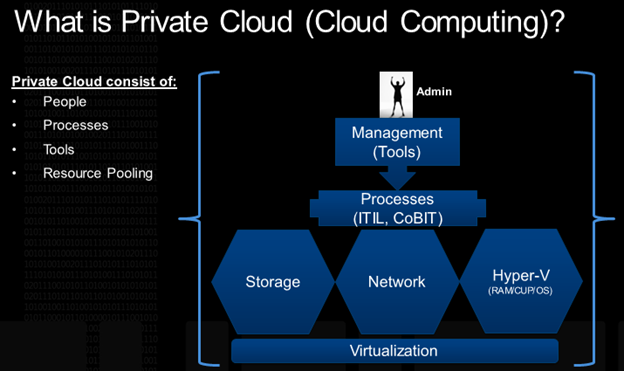
If you don’t have Virtualization or cloud based service delivery concept at all, then this is your right time to see the possibility to start virtualizing your core application and take benefit of Cloud Computing. It should be noted here that Cloud Computing is not Virtualization or Server Consolidation. Cloud Computing is more of combining Resources, People, Processor and Technology. If you are planning to implement a large set of companies Exchange messaging organization then putting Exchange as a virtualized instance will give you much more flexibility over managing these multiple instances with the new range of System Center 2010 tools available to help you.
Combine Exchange Server with Windows Server 2012 Hyper-V and get most of your Exchange Virtualized Implementation
With the recent version of Windows Server 2012 and Hyper-V, you can get most of your virtualized Exchange implementation. Windows Server 2012 Hyper-V gives you many features which will make your virtualized Exchange workload more flexibility than you could dream from your physical implementation of Exchange Server. This new version of Hyper-V gives high level of service scalability by allowing you to add up to 160 logical processors, 1 TB of memory for your Exchange virtual machines, 64 TB of Virtual Hard Disk for Exchange OS/Application or even for Exchange mailbox database LUNs.
On top all these great flexibility we get from Windows Server 2012 and Hyper-V, Windows Server 2012 Hyper-V provides the relax virtual machine migration and mobility solutions, where now you can migrate and mobile your Exchange virtual workload from one Hyper-V (Hypervisor) to another using various types of available migrations, such as Live Migration with Shared Storage, Live Migration without shared storage, and Live Migration to a SMB Network share. So if you see this type of flexibility we can never get from a physical infrastructure, which means taking a physical Exchange server for a long time maintenance might affect your service availability, but if you were running the same Exchange server as a virtual machine then you could migrate it from one running physical server host to another with many available migration styles.
Dual Layer of High Availability of Exchange Virtualized Server Roles
Back in time initially Exchange DAG member Mailbox Server virtual instances were not supported to run on a clustered hosting, but later with Exchange Server 2010 SPs release this become true and Exchange DAG Mailbox server virtual instances got supported to run on a clustered Hyper-V host machines. This extended support for Hyper-V virtual machine for Exchange DAG enabled Mailbox Servers provided dual layer of high availability for Exchange virtualized instances. This means now you have one layer of the Exchange Database Availability Group for ensuring that one database should always remain active, and in case if something goes wrong the passive copy of the database should take over the load.
And the second layer of high availability also takes care that if you Hyper-V host needs to go under the maintenance you can migrate the Exchange Mailbox Server and all other types of Exchange Server Role VMs can be migrated to another Hyper-V Cluster host. And this is not all if you want you can also migrate the same Exchange VM to the outside of your cluster hosts to any Windows Server 2012 based Hyper-V server.
Conclusion
All these flexibilities and scalability feature we discussed for virtual implementation of Exchange Server, you cannot get from a physical implementation of Exchange Server. And from a practical standpoint I have seen great benefit people enjoy by virtualizing Exchange Server instead of putting on a dedicated hardware. But with all the greatness we mention of virtualized infrastructure, we should also be focused here that a virtual machine might need more focus for tuning and tweaking its performance than a physical server.
So if you are planning to put your Exchange Server as a virtual machine, then you should be more careful while planning and designing your virtualized platform, otherwise you might end up with performance issues for your Exchange workloads.
I hope you found this article as useful and should be able to get benefits while making the decision to virtualize your Exchange messaging service.
Cheers!
The GeekShell Blog
 Azure Hybrid & Cloud Migration Blog
Leave a comment