Recently I ran into a situation where after installing McAfee Virus Scan Enterprise 8.8 with the compatible agent (4.6, Patch 3) on Windows Server 2012 Hyper-V Servers, we couldn’t create new virtual machines and also we were not able to modify the virtual machine settings. Which was normal as by design A/V software stops low/high risk processes by having on-access protection. As desired after sharing the required A/V exclusions for Hyper-V with A/V administrator, we were still not able to create new VMs and modifying their settings.
Following list of exclusions we tried with McAfee but we were failed:
| vmms.execlusssvc.exevmwp.exe
msdtc.exe C:\ProgramData\Microsoft\Windows\Hyper-V C:\Users\Public\Documents\Hyper-V\Virtual Hard Disks C:\ProgramData\Microsoft\Virtual Machine Manager C:\ProgramData\Microsoft\Windows\Hyper-V C:\ClusterStorage |
Since everything was excluded we were not able to achieve the desired goal, so we opened support case with McAfee and Microsoft. During this engagement Microsoft came up with the same exclusion as there wasn’t anything extra we could do with it. And then McAfee came online took series of logs, and later came with final solution with fixed the problem.
Symptoms
How you can make sure that it is A/V which is interrupting the Hyper-V operations, when you disable the A/V protection on Hyper-V server, you can see that you would be able to modify existing creating VM settings or you can also create the new VMs. When we did the same thing with McAfee we found that everything works like charm.
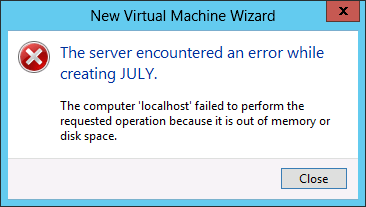
Also when you try to create or delete new virtual machine while having missing Hyper-V exclusions from A/V side, Hyper-V process interruption symptom would look like the below error message:
Cause:
We found that we were excluding the correct desired processes and directories but the way we were putting these exclusion into the A/V or EPO was wrong.
Solution
Below are the correct exclusions you have to put into the McAfee EPO VSE or any other A/V solution you are using for Windows Server 2012 Hyper-V protection:
1:- Configuring Low Risk Processes Exclusion
We have to add VMMS.EXE and VMWP.EXE as low risk processes.
2:- Configuring Low Risk Files and Directories Exclusion:
In the second exclusion we have to exclude the following directories and file types as low risk in McAfee:
| C:\ClusterStorage\C:\ProgramData\Microsoft\Windows\Hyper-V\**\Virtual Machines\*.xml
**\Virtual Machines Cache\*.xml **\*.vhd **\*.vhdx **\*.avhd **\*.vsv |
Note:
Make sure that you use the exact same exclusion string for your exclusion, e.g. **\Virtual Machines\*.xml and **\*VHDX, because usually A/V like McAfee by default only allows you to put 3 DIGIT base file extensions for exclusion.
Also you have to make sure that your A/V policy should open in low risk processes mode, because by default A/V exclusion works for normal processes exclusion. In McAfee EPO there is a way you can configure the policy to open in low-risk exclusion mode by default.
I hope this article would help you to fix your A/V exclusion problem for Hyper-V servers. Cheers!
 Azure Hybrid & Cloud Migration Blog
Leave a comment