Patch Management Overview
Patch management for any sort of software or operating system is the ability to ensure that your environment stays under supported and healthy state. If we talk particularly about Microsoft we get every month series of patches released for various Microsoft software products and operating systems. These patches usually get released in the third week of each month. Now there are two available methods for customers for installing these patches, either they can use WSUS – Windows Software Update Services ( also SCCM) or any other sort of third-party application which pushes the patches to these machines.
Installing patches on workstations as compare to server operating system is quite different, because on PCs we can set a timeline that OK after this time restart the machines. But on the operating system it is always recommended that the patches gets downloaded automatically and only administrator can install them and restart the server when he or she thinks that this is the good time. And for the same usually in bigger or smaller environment majority of the customers uses WSUS in addition to the Active Directory Group Policy to publish and download the patches from a central WSUS server to all the machines.
Difficulty for Installing Patches
The main issue enterprises face with the above type of patch management, where WSUS or SCCM server is used to centrally pushes and download the patches on the server, and administrator has to go and manually install patches and restart the server. This is still OK for smaller organization but when we talk about big customers it is merely impossible that the administrator can login on to the all servers on the monthly maintenance or the patch management day and install patches. This also leads to the situation where customers miss their servers for some important security updates, which then later can be exploited a vulnerability.
Centrally Manage Patch Installation
Recently I happened to look into a tool which can help me to install patches pushed by WSUS on a large number of servers, and most importantly restart the servers remotely. And while I was searching a utility for this solution, I came across one interesting tool PoshPAIG (PowerShell Patch Audit/Installation GUI). This is a PowerShell based Microsoft patches auditing, reporting and installation tool.
How this works?
All you have to do is to download the script from the below provided link, and right-click on the “Start-PoshPAIG.Ps1” file and click on “Run with PowerShell”. This will launch the PowerShell Patch/Audit Utility.
For this to work you should have .NetFramework 3.5.1 and PowerShell 2.0 installed on the server from where you want to launch this application. I tried this running on Windows Server 2008 R2 and Windows Server 2012 RTM version and it works flawless. Also the most important requirement is that you download the PSTool kit and extract all the files and keep them in the same working directory where you keep the PowerShell Patch/Audit Utility “PoshPAIG.PS1” files. And don’t change the any file or directory name even you have to keep the root or any other sub-directory or file name as default as “PoshPAIG_2_1_5”, because this is hard-coded in the utility.
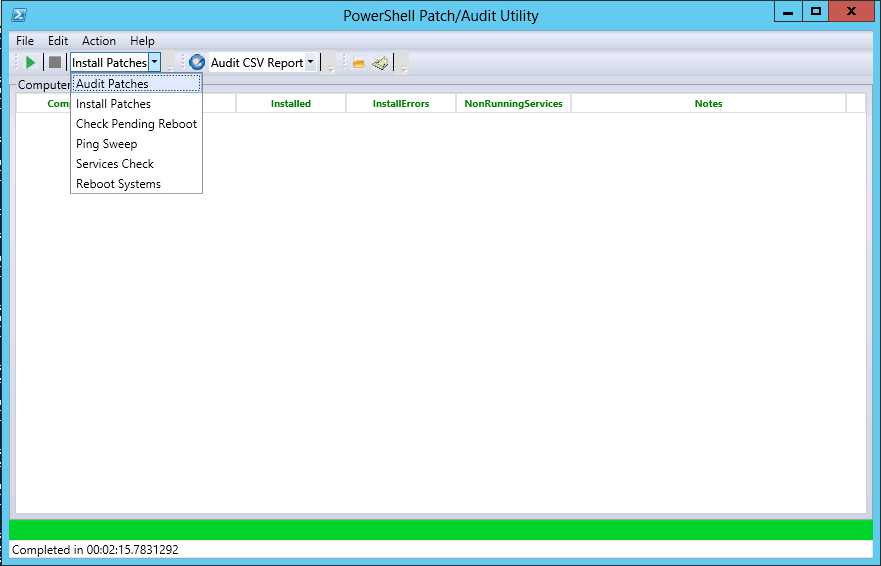
Download this tool from here, and for technical documentation click here.
Following are few of the great benefits this tool provides:
- Audit Patches
- Installing Patches
- Checking Pending Reboot
- Ping Sweep
- Service Check
- Reboot Systems
Hope you would like this discovery and it would help you to make your patch management much easier.
Cheers!
 Azure Hybrid & Cloud Migration Blog
Leave a comment