Author: Zahir Hussain Shah | MVP Exchange Server, CISSP
Before some time ago, I authored an article describing the process of Converting a Physical Windows Machine into VM for Microsoft Hyper-V, this solution works greatly for any verion of Windows, and today while we were trying to converting a Windows Server 2003 phyiscal box into VM for Hyper-V, we succeeded in converting into the VM, and then after brining the VM up first time, and after installing the Microsoft Hyper-V Integration Services, we ran the Windows Server 2008 In-place upgrade, which also got 75% completed, but then later we encourtered a problem when the server restarted during upgrade process as follows:
Problem:
Windows failed to load because a critical system driver is missing or currupt”
File:windowssystem32DRIVERS/symmpi.sys
status:0xc0000359
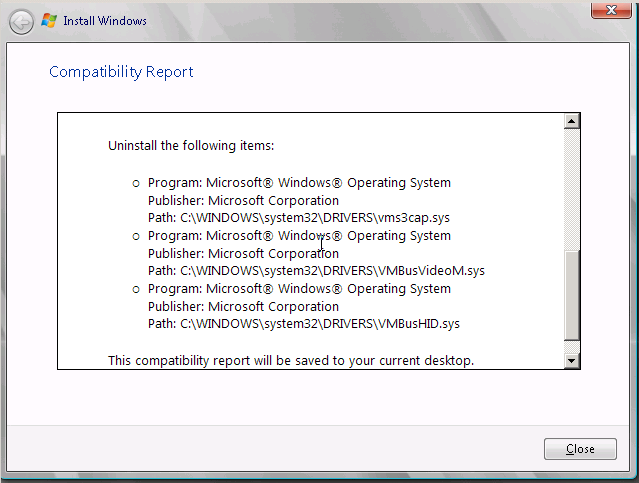
In addition to the above error, before hitting the installation button on the upgrade page of the installation, we also saw some of the compatibility errors, while upgrading the Windows Server 2003 to Windows Server 2008 as follows:
Cause:
During the upgarde process of sysmmpi.sys, the installation process could not upgrade the symmpi.sys, thus Windows Server 2008 installater got stuck on this point.
To finx this problem, follow the steps mentioned below in the solution section here.
Resolution: (Source: Tim Quan MSFT on the Microsoft TechNet Forum)
1. Put the Windows Server 2008 installation disc into the disc drive, and then start the computer.
2. Press a key when the message indicating “Press any key to boot from CD or DVD “. appears.
3. Select a language, a time, a currency, and a keyboard or another input method, and then click Next.
4. Click Repair your computer.
5. Click the operating system that you want to repair, and then click Next.
6. In the System Recovery Options dialog box, click Command Prompt.
7. Use DOS commands to rename symmpi.sys in C:windowssystem32DRIVERS to symmpi.old.
Restart the computer and test the result.
Cheers!

 Azure Hybrid & Cloud Migration Blog
Leave a comment