Author: Zahir Hussain Shah | MVP Exchange Server, CISSP

Step by Step Guide for Troubleshooting Microsoft Exchange Server 2010 Mailbox Database Transaction Logs Truncation Problem, where a VSS backup tool (Symantec Veritas Netbackup) is failed to truncate the Exchange Mailbox Database Logs after the successful Backup
Recently, I gone through a troubleshooting session, where Exchange Server 2010 Mailbox Databases Transaction Logs were not able truncated after the successful VSS Full Backup, in this scenario, we were seeing Symantec Veritas NetBackup 7.x was not able to purged the logs after the successful backup, or you can say that with the scheduled backup policy, NetBackup client agent APIs were not able to communicate properly with MSExchange for purging the logs, and which resulted in increase of Exchange Mailbox Database LUN sizes.
Problem:
Microsoft Exchange Server 2010 Mailbox Transaction Logs truncated issue due to NetBackup Full Mailbox Database backup failed to purged the logs / Microsoft Exchange Search Indexing Service which was not allowing the Replication Service to truncate logs.
Cause:
NetBackup client agent APIs were not able to communicate properly with MSExchange for purging the logs, and which resulted in increase of Exchange Mailbox Database LUN sizes.
Solutions:
In the solution area of this blog post, I will guide you the various options available to you for fixing this problem, but we will hit first those, which contains less administrative over-head from the MSExchange Admin side, and we will try to get the issue resolved from the NetBackup side, because as it sounds from the title of the blog, which says that NetBackup is failed to purge the Exchange Mailbox Transaction Logs. Poor you Exchange Server :(
1) Re-installing Symantec Veritas NetBackup Client Agent software on all the Microsoft Exchange Server Nodes, including CAS and Mailbox Nodes.
Note: Why I mentioned this option first, is because in my case, we tried this option, and it fixed the problem and automatically purged the logs.
2) Make sure that your NetBackup services on both Exchange CAS and Mailbox Servers are running with a proper Domain Account, which has appropriate rights on your Exchange Mailbox Store (database), and try to see that the Services can restart with this domain user account.
Note: In our case, I saw that after we reinstalled the NetBackup agent all the nodes, Netbackup services were not able to start up, because of the problem with Log on failure error, so you setup it correct, and make sure everything looks like hunky-dorry.
Note: After you performed the both options, try to execute the full backup of any of the smallest Exchange Mailbox Database, and see whether Netbackup is able to purge the logs or not, if it fails again to purge the logs, and you dont have enough space available in the Mailbox Database LUNs, so you can perform the below step to make the necessary disk space available in the LUN to mount the database again, and fix the log purging issue for Netbackup.
3) If your NetBackup administrator informed you that NetBackup is not able to purge the logs, due to the Microsoft Exchange Search Indexing Service which was not allowing the Replication Service to truncate logs, so in this case, you can perform the step 3, which will clear this point, and if this fixes your problem, then you are all good, if it doesnt then, we will move forward on the road to fix this problem.
Okay, so in this step 3, we will perform the below steps:
Dismount the Microsoft Exchange Mailbox Database, which is failed to be purged for logs by NetBackup.
Stop Microsoft Information Store Service on this passive Mailbox Database Node first.
Go to the Mailbox Database folder, and then delete the CatalogData folder.
Start the Microsoft Information Store Service.
Mount the Database.
Note: Catalog data building will take time depends on the size of the database.
Mailbox Database Catalog Folder:
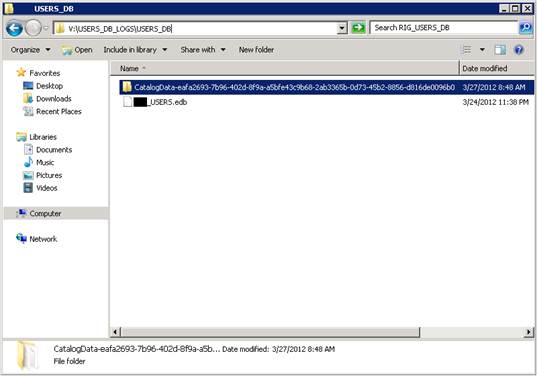
Upon the completion of the Mailbox Catalog building, then once again you can take the Full backup of the Database, and we will see whether it is able to purge the logs or not, if it is still failing to purge the logs, and you dont have much time left for NetBackup to purge the logs, and database is in dismounted state due to the free disk space availability, you can perform the 4th step here:
4) This time in the 4th step of this solution, where we saw that all the above steps were not able to fix the problem, and sometimes due to the courted and missing Exchange Mailbox logs, NetBackup or any VSS backup tool fails to purge the logs, so in this case, we will perform this step as follows:
Dismount the Exchange Mailbox Database.
Move the Exchange Mailbox Database Transaction logs to a different directory.
Mount the Exchange Mailbox Database.
With the above step performed, when you will mount the database again, Exchange Server will start creating logs in the sequence, and then there will be no problem for the disk free space availability, because then moment you will mount the database again, Exchange will automatically purge all the logs, and then there will be only new logs.
Okay so now we have free space in the disk to mount the database, and let the user to connect with Exchange Server, and ask your Netbackup admin to take the full backup of the Exchange Database, and now this time it should work, if your NetBackup admin and the tool both are happy, if there is still problem for purging the logs automatically with full NetBackup backup, then you better create a support session with Symantec Support, and tell them that you have done everything from the Exchange side, and nothing is there to be blamed on Exchange. :$
I hope with this step by step guide to fix your Microsoft Exchange Mailbox Database Transaction Logs purging problem, you enjoyed reading the article, and gained knowledge to keep your Exchange logs truncated wherever is needed.
Cheers!

 Azure Hybrid & Cloud Migration Blog
Leave a comment