Author: Zahir Hussain Shah
Changing Local Administrator Password of all Severs with just two mouse clicks
As it is quite straightforward as it sounds that most of the IT organization, I mean good-ones, which changes the password of all Servers, Applications and Appliances on the quarterly or monthly basis, always wants to automate this task, so the Administrator changes the password for all the Production and RnD Servers at the same time.
Fortunately, I belong to the same good-ones of IT Company, where we do have a policy, which says to change the password on the quarterly basis, and therefore I wrote this article, to share my method of changing / resetting the LOCAL ADMINISTRATOR ACCOUNT PASSWORD with just TWO CLICKS :)
So lets talk about the TWO CLICKS for changing the password
Step 1) Export the list of computers (Servers) for which you want to reset the password.
For making this list, go to Active Directory Users and Computers and locate the OU, where you are keeping the all COMPUTER ACCOUNTS for your Servers, lets say you are keeping the ALL SERVER COMPUTER ACCOUNTS in SERVER OU in your ACTIVE DIRECTORY, so I will go to SERVER OU and export all the COMPUTERS ACCOUNT TO a MachineList.Txt.
Example: Export List
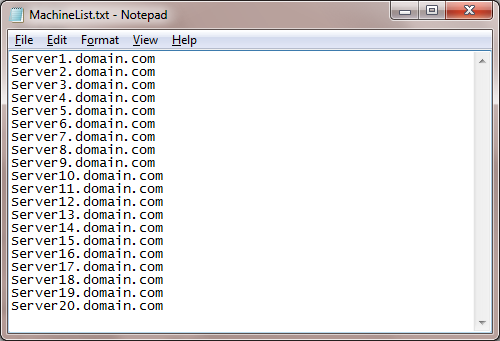
Step 2) Download the .VBS script from the below location (SkyDrive), and only change the file name of your exported computer account list, if you kept the same as I described above then you dont need to do anything.
| Reset_Local_Admin_Password_Script_Windows.vbs |
Note:
Make sure that the MachineList.txt file, which has all the computer accounts information, should be in the same folder, from where you are executing the script.
Step 3) Double click on the script, and then you will see a small dialog box will open as below image, where you will enter the required password, which you want to change on all machines, belongs to the above exported list:
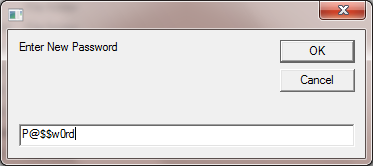
Upon pressing OK button on the ENTER NEW PASSWORD dialog box, results of successful or failed Servers for password reset will be exported as excel sheet, as showing in the below image:
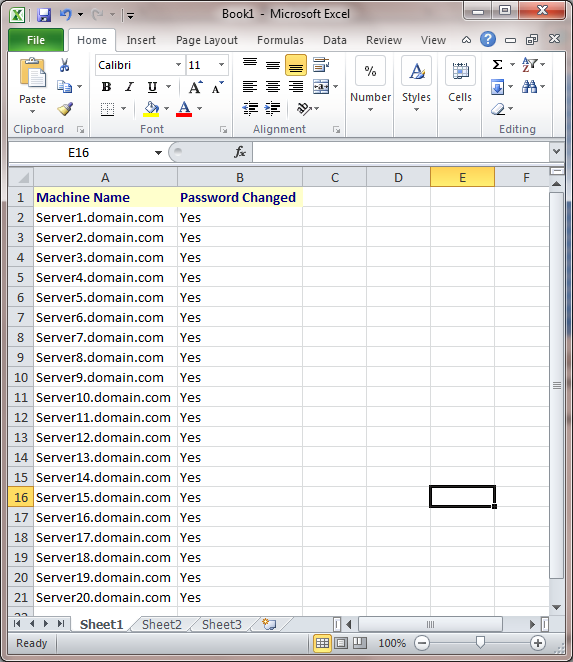
And now you are done with your quarterly password changes, and with only TWO CLICKS J isnt it fun
Cheers!
Zahir Hussain Shah
Infrastructure Practice Consultant – Unified Communications
MCSE, MCTS, MCTIP Enterprise Administrator, CCNA, ITIL
Blog: http://zahirshahblog.com | LinkedIn | Twitter
 Azure Hybrid & Cloud Migration Blog
Leave a comment