Author: Zahir Hussain Shah
Integrating RightFax Server with Exchange Server 2010 for Relaying Emails for DOMAIN.FAX (RightFax Domain) SMTP Namespace
Takeaways:
This article will discuss the various components for allowing your OpenText RightFax Server to integrate with your Microsoft Exchange Server Messaging Organization, and mainly it will discuss the configuration, which Exchange Administrator has to do on the Exchange Hub Transport Servers for allowing the RightFax Server and Outlook Clients, so when they send faxes from their Outlook to RightFax Server with a newly created SMTP Address Sapce (DOMAIN.FAX), so Exchange Server understands this and forward it to RightFax Server for Fax transmission.
An overview:

Scenario:
Lets assume that there is a company DOMAIN SOLUTIONS, which has their external domain Zahir, and recently they deployed RightFax Server in their environment, now the company wants to allow their end-users to send faxes from their Outlook, and for this the RightFax Administrator created an additional SMTP Address-space as DOMAIN.FAX, so when users will send a fax with the desried fax number in the email format, e.g. 4552392, so the RightFax Server will understand it and then forward it to the destination.
What is the problem?
By default when your Exchange users send faxes with the above explained format as 4552392, your Exchange Server Rejects the message, and cannot forward it to RightFax Server for the fax delivery.
Cause:
Since because Exchange Server by default doesnt that it should consider it as External Relay Domain, so it keeps try to deliver it, but when it finds nothing, then it generates NDR and through it to user.
Solution:
Frist of all, let me break this solution, into two pieces as follows:
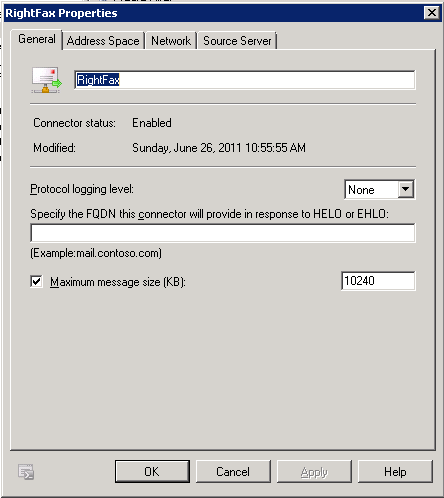
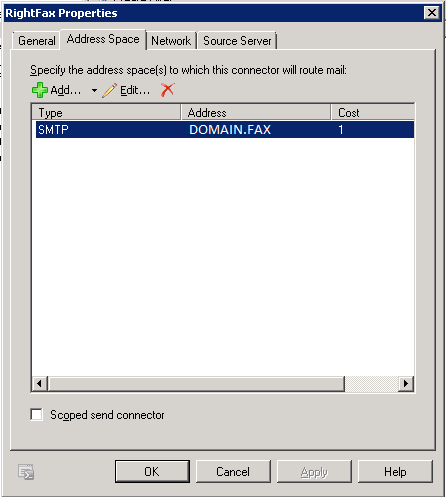
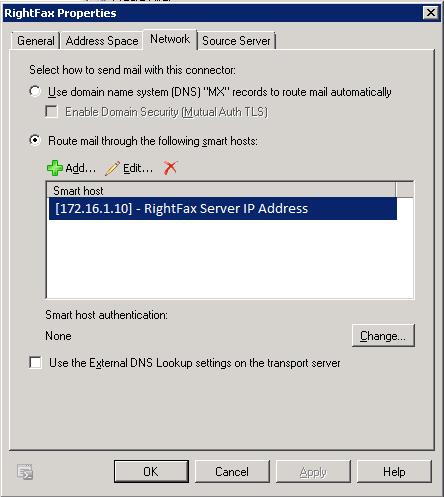
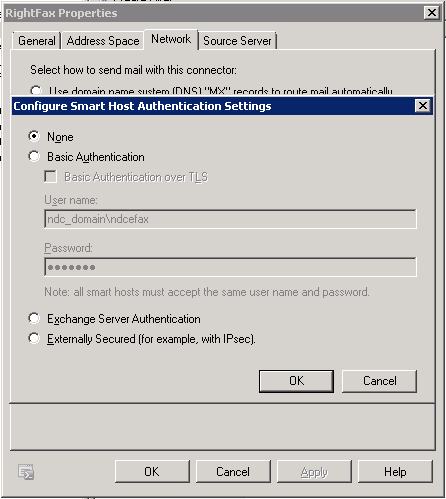
1) Creating required send connector in Exchange Server (HUB) to forward the email messages for DOMAIN.FAX SMTP Namespace to RightFax Server
2) Add DOMAIN.FAX as an External Relay Domain in the Accepted Domain List in Exchange Hub Transport Server
Creating required send connector in Exchange Server (HUB) to forward the email messages for DOMAIN.FAX SMTP Namespace to RightFax Server:
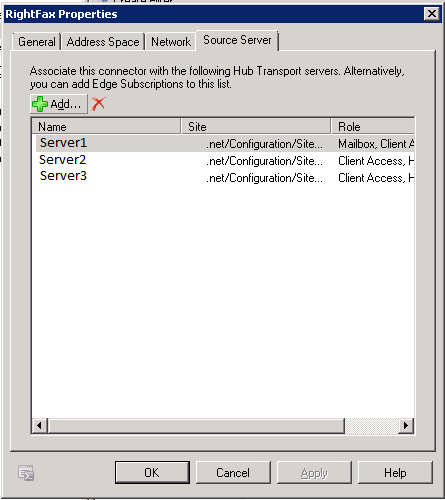
Add: all the Exchange Hub Transport Servers for this connector:
As a second part of this configuration, now we have to add DOMAIN.FAX as a External Relay Domain in the Accepted Domain tab on Exchange Hub Transport Server:
1) Open Exchange Management Console
2) Go to Exchange Organization Configuration
3) Click on Accepted Domains Tab
4) Create a new Accepted Domain Entry, and create the entry as follows:
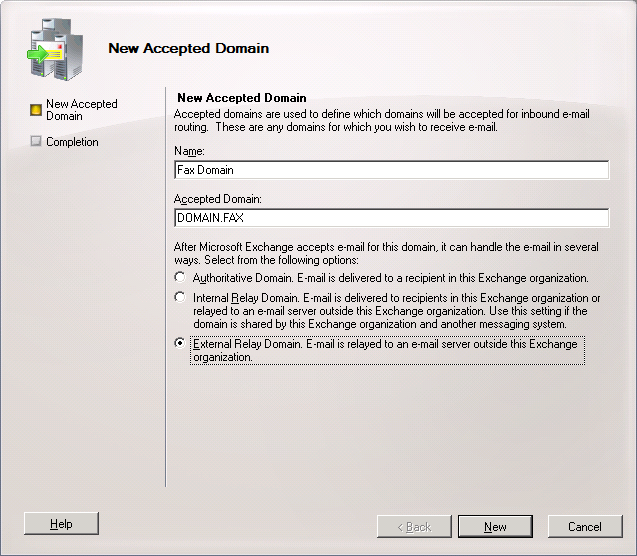
Note: You can have your own created External Relay Domain, like Contoso.Fax or whatever, you just need to add that entry in the Accepted Domain filed, and choose it as External Relay Domain. E-mail is relayed to an e-mail server outside this Exchange Organization.
I hope this article will help you to fix your RightFax and Exchange Server integration issues, and will help you to finish your deployment.
Cheers!
Zahir Hussain Shah
Infrastructure Practice Consultant – Unified Communications
MCSE, MCTS, MCTIP Enterprise Administrator, CCNA, ITIL
Blog: http://zahirshahblog.com | LinkedIn | Twitter
 Azure Hybrid & Cloud Migration Blog
Leave a comment