Updated on 8/9/2011
Author: Zahir Hussain Shah
Preventing PST Creation in your environment after implementing Archiving Solution
Tags: How to prevent Outlook PST Creation | How to prevent PSTs in Outlook 2003 / 2007 / 2010 | Disable PST creation in Outlook
Introduction:
Once you have Email Archiving Infrastructure ready to support your Exchange 2010 Messaging Infrastructure, you would be planning to restrict end-users to increase their PSTs, and to some extent you would be more interested to allow them to user their existing PSTs, but in the same time, restrict them from doing the following:
· Cannot create more PSTs
· Cannot add more data into their existing PSTs
Solution:
Let me show you how you can achieve this using Group Policy for Microsoft Office GPO Administrative Templates…
You have to download the Microsoft Office Administrative Template, for each MSOFFICE version, you can easly download it by serach it.
Like one I’m going to use here is Office 2010 Administrative Template files (ADM, ADMX, ADML) and Office Customization Tool
http://technet.microsoft.com/en-us/library/cc178992.aspx (Download it)
Ø Once you download it, open Group Policy Management Console, create new GPO and in the User section, for Administrative Teamplates, import it as follows:
Open the “ADM” folder and the appropriate language subfolder (en-us for English), select the file named “outlk12.adm” and click “Open”.
Ø Once you import it, then setup the PST policies according to your requirement:
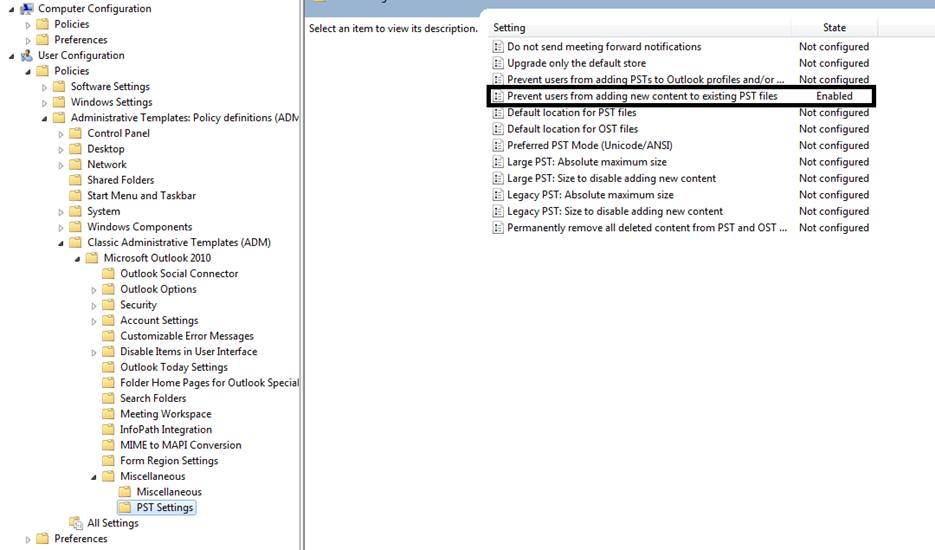
Once you are done with changes, close it and let the user to log off and login back.
Since we allowed users to create new PSTs, but when they will try to put anything inside the PSTs, they will get “ACCESS DENIED” error.
You can also enable setting in the GPO, which will completely disabled creation of PSTs as well.
I recommend before you apply this to production users, first test if for some test users and then apply it for production use.
Update:
Later after writing this article, I was informed about a scenario, where Microsoft Outlook considers the Enterprise Vault (Cache) as same as PST, so in this case, it won’t allow the EV Policies to move data from Exchange Mailbox to EV Vault, and which breaks the EV Client Side Policies, and therefore I was asked to find a solution for this so, even I’m restricting the DisabledPSTGrow but in the same time, I want the EV Vault Cache to work fine, so in this case, there is another Registry Entry you have to create, which will instruct Outlook to allow Authenticated entities like EV Vault to work with moving emails from mailbox to them.
- Enterprise Vault 2007 Service Pack 3 or higher
- Microsoft Outlook 2007 hotfix
- The following registry keys:
Outlook 2003
- Enterprise Vault 2007 Service Pack 3 or higher
- Microsoft Office Outlook 2003 SP3
- Microsoft Outlook 2003 Hotfix
- The following registry keys:
For more information, please see this link
Cheers!
Zahir Hussain Shah
Infrastructure Practice Consultant – Messaging Solutions
MCSE, MCTS, MCTIP Enterprise Administrator, ITIL
Blog: http://zahirshahblog.com | LinkedIn | Twitter
 Azure Hybrid & Cloud Migration Blog
Leave a comment