Article: Zahir Hussain Shah
Tags: How to install SQL Server 2008 Cluster | There was an error setting private property “RequireKerberos” to value “1” for resource SQL Network Name (Server)
How to: Install SQL Server 2008 Failover Cluster on Windows Server 2008 R2
SQL Server 2008 Cluster Installation Error:
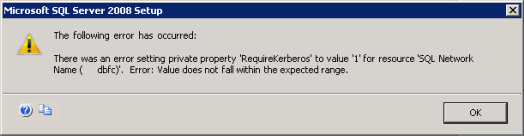
Being an Exchange Server Engineer, working with Cluster Technologies is always an interesting job, recently, I had a requirement to build SQL Server 2008 Failover Active/Passive Cluster on Microsoft Server 2008 R2 Servers, and when I tried it first time, it failed with above mentioned error There was an error setting private property “RequireKerberos” to value “1” for resource SQL Network Name (Server)”, which was quite annoyed for me, and after did some research on this problem, I came to know that this is a known issue with SQL Server 2008 installation, while combining it with SQL Server 2008 Service Pack 1 installation.
Problem:
I need to install SQL Server 2008 Failover Cluster on a Windows Server 2008 R2 operating system. As per Microsoft KB article 955725, you would need to install SQL Server 2008 together with SQL Server 2008 Service Pack 1 or a later update as a minimum requirement. How do I proceed with a successful installation and not encounter the listed issues? In this tip I will show you how to create a slipstreamed version.
Cause:
This is because Windows Server 2008 R2 (including Windows 7) does not use the RequireKerberos property to determine whether Kerberos authentication is enabled for a Network Name resource and is the very reason why the Failover Cluster installation of SQL Server 2008 RTM fails. In order to prevent this, we would need to create a slipstreamed version of the SQL Server 2008 installation media that we will use for the setup process.
Well, now discuss the workaround and resolution to fix this problem
Note:
When first time your installation gets failed, dont format your servers, all you need is to rerun the setup and click on Install Failover Cluster, and can complete the installation.
Solution:
To create SQL Server 2008 slipstreamed installation for building SQL 2008 Cluster, follow the below URL, where you will find step by step guide for fixing this issue.
Step by Step guide for creating SQL Server 2008 Slipstreamed Cluster Installation: http://www.mssqltips.com/tip.asp?tip=1902
Note:
In the above URL, author is directing to download the SQL Server 2008 SP1 for installing SP1 including with SQL Server 2008 Installation, but you can directly go for SQL Server 2008 SP2, instead for going SP1.
After installing the first SQL Server 2008 Cluster node, use the same slipstreamed method specified in the above article to install the second SQL 2008 Cluster Node.
If you want to know how to build based Windows Server 2008 R2 Cluster (MSCS) for SQL Server 2008 Cluster, follow the instructions in the below article:
http://www.mssqltips.com/tip.asp?tip=1687
I hope this post, will help lots of SQL Administrators for making the SQL 2008 highly available!
Cheers!
Zahir Hussain Shah
Infrastructure Practice Consultant
MCSE, MCTS, MCTIP Enterprise Administrator, ITIL
Blog: http://zahirshahblog.com | LinkedIn | Twitter
 Azure Hybrid & Cloud Migration Blog
Leave a comment