Author: Zahir Hussain Shah
After installing Exchange 2007 Service Pack 2 / Service Pack 3, some of Exchange 2007 Services are not starting
Problem Statement:
It has been observed that when you install Exchange 2007 Service Pack 2 on your Exchange 2007 SP1 or RTM version, after the successful installation of Exchange 2007 SP 2 installation, some of the Exchange Services do not come up, and when you try to manually start them they simply dont start, and give the following error:
Error / Symptoms:
Windows could not start the “Exchange Mailbox Replication Service on the local computer.
Resolution:
We recently faced this issue, and while troubleshooting, we found that the configuration file for Microsoft Exchange Mailbox Replication, Exchange Mail Submission, Exchange Transport Log Exporter and Microsoft Exchange Server Transport services got damaged or something.
So for resolving this problem:
1) we cut and pasted these affected services configuration files from C:Program FilesMicrosoftExchange Serverbin and pasted somewhere in the temp directory as a backup.
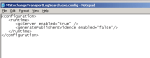
2) Opened a notepad, and copy and pasted the same text from the old configuration file copied in the temp folder, and save as MSExchangeMailSubmission.exe.config (ALL FILES for saving as config file)in the same directory as C:Program FilesMicrosoftExchange Serverbin or wherever you have installed Exchange Server on the Server.
3) After the completion of step 2, you can try to start the service, and you can see it will come up normally.
You can follow the same procedure with all the affected services, which are not coming up after the installation of Exchange 2007 SP 2 / SP 3.
Smaple config Files snapshots:

I know it is quite annoying that since the installation completed successfully, everything should work fine, but this happens sometimes, and it becomes more critical when, you have single Exchange Server, and you cannot bear any down time.
I faced this issue, while preparing legacy Exchange 2007 environment for Exchange 2010 upgrade, so I hope if you face the same problem, so you can fix it before further go for Exchange 2010.
Cheers!
Zahir Hussain Shah
Infrastructure Practice Consultant – Unified Communications
MCSE, MCTS, MCTIP Enterprise Administrator, CCNA, ITIL
Blog: http://zahirshahblog.com | LinkedIn | Twitter
 Azure Hybrid & Cloud Migration Blog
Leave a comment