Step by Step Upgrade Exchange 2007 to Exchange 2010 | Exchange 2010 Implementation on Hyper-V

Article by: Zahir Hussain Shah

Upgrade Exchange 2007 to Exchange 2010 over Hyper-V, Step by Step

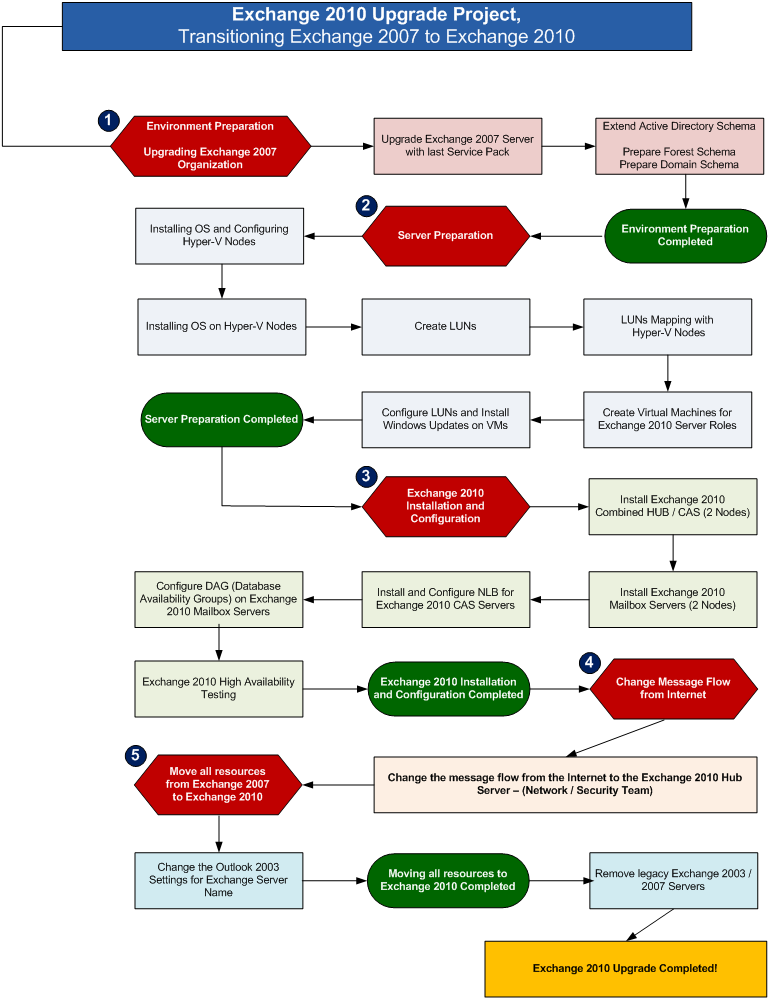
As most of you are planning to transition / upgrade your legacy Exchange 2003 / 2007 Messaging Platform to Exchange 2010, and during this planning stage, we always need to have a solid upgrade road map, which leads us to the successful legacy Exchange upgrade, and provides help to plan each and every single aspect of Exchange 2010 Upgrade Project.

In this article, I will provide you a step by step guidance that from where you exactly need to start your legacy Exchange upgrade, and will break the entire Implementation phase into sub-set small phases, which will help you to plan each project phase individually, for making sure that you have enough resources and information available to successfully transition your legacy Exchange Servers to Exchange 20010.
Cheers!

Zahir Hussain Shah
Infrastructure Practice Consultant – Unified Communications
MCSE, MCTS, MCTIP Enterprise Administrator, CCNA, ITIL
Blog: http://zahirshahblog.com | LinkedIn | Twitter

39 responses to “Step by Step Upgrade Exchange 2007 to Exchange 2010 | Exchange 2010 Implementation on Hyper-V”

  1. Hi,

    Thanks for the diagram, I’m going to use it as a template in our migration plan.

    Cheers,
    Daniel.

  2. Thank you for your appreciation;

    Zahir

  3. Hi Zahir,

    We have Exchange 2003 and 2007 enviorement We are planning for Exchange 2010.

    We have Ex2007 in cluster mode, One CAS and HUB server.

    can you provide me the steps which i can follow ?

    Kris

  4. Hi Kris,

    As per you descirbed your transitioning scenairo, so I would recommend to follow the below proceedure:

    1) Build Exchange 2010 Environment (HUB / CAS / MAILBOX – DAG optional)
    2) Start Migrating Resources (Mailboxes) to Exchagne 2010 from both Exchagne 2003 / Exchange 2007
    3) After mailbox migration completes, change the External Mail Flow and User Conntivity from Exchagne 2003 FE or Exchange 2007 CAS / HUB Servers to Exchagne 2010 HUB / CAS.
    4) After running co-existence for awhile, and completing the transitioning of resources, you can go for decommissioning your legacy Exchagne Server.

    For more details, please do let me know.

    Zahir

  5. Hi Zahir,

    I would like to ask you that I have just migrated exchange 2003 to exchange 2010 on virtual server (hyper-v)and now planning to configure DAG for failover. Is this possible to create DAG on other server physical box.

    required your input to make it finalize.

    Thanks in advance

  6. It dose not matter weather you have Exchange 2010 Mailbox role installed on either VMs or Physical Server, for making your Exchange 2010 highly Available, all you need to have is at least two Exchange 2010 mailbox Servers, you can achieve this by following:

    – Install two Exchange 2010 mailbox Servers
    – Create / Associate LUNs of same capacity on both Mailbox Servers (and give these LUNs/Drives same drive letter)
    – Create DAG in Exchange 2010 and give IP Address (STATIC)
    – Add both mailbox Servers in the DAG
    – Add Database copy for the other DAG Mailbox Server

    if you need to know more about this, do let me know

    Zahir

  7. Thanks for reply, is this possible that have different drive size and different drive letter to create DAG ?.

  8. Drive letter should be same acorss both servers, because, just like other Cluster Technology, OS / Application aware replications looks for the same driver letter in the case of failover and write / replicate database from one server to anoether.

    LUN / Drive size can be different, but since same amount of data will be write in both drivers acorss servers, so it is always recommended to keep same size of LUNs / Drives for Exchange mailbox database.

  9. In Exchange 2010, there is a way to create policy that delete log files after 30 days interval time or have any other solution which fullfill my reqiurements. I have limited space and log file size is getting bigger day by day.

    Thanks in advance

  10. Hi Hamu,

    Are you using any kind of backup software to back up your Exchange 2010 environment, it seems like you are not using, and that is the reason why your Exchange database logs are growing.

    Well to fix this problem, you can go for any VSS based backup utility, like Symantec BackupExec or Symantec NetBackup, as these are industry’s best backup solutions for Exchange.

    If you can not afford to have these software, then I believe you can also look for Windows Server native backup utility (formally known as NTBackup), you acn take the Exchange backup using Windows Server 2008 / 2008 R2 Backup Feature.

    For more information about Windows Backup for Exchange do some research, and you will find a good step by step guide for it, or look for www,.simple-talk.com.

    Zahir,

  11. Wow, and to think I was going to prepare a similar document from scratch – why reinvent the wheel? Thanks!!!

  12. Hi Zahir,

    Thanks for the brief diagram, can i have this template in visio so i can edit and use it in our project plan.

    Regadrs,

    Azhar

  13. Hi Azhar, sure, no problem.

    Let me see, if I have this visio still with me.

    Zahir

  14. Hi Zahir,

    Any luck.

    BR

  15. Hey Azar,

    Accept my apology, because I can’t find it in my PC, but in any way, you got the idea, and best of luck for your implementation.

    Zahir

  16. No issues

    regards,

    Azhar

  17. why do you have the DAG as static? any reasoning? We are using a DAG that is DHCP.

  18. As long as this option is available, so I would say that keeping this is not a problem, but when it comes to the recommendation a.k.a best practices, so we recommend to have static IP Address, and this concept is same as same as you would go for static IP Address for any kind of cluster solution SQL, or Domain Controllers, because with Static IP Address the realiability gets increase, because, it will not keep any room left for conflict or cache-ip-address (DNS entry with wrong ip) with DHCP IP lease expiry or renewed.

  19. Good workflow ..but I am looking for adding stage of issue new exchange 2010 certificate which required for co-existence and so adding new DNS name “Legacy.mydomain.com”
    Thanks for your efforts…

  20. Hello Mohamed,

    As you stated that you are looking for adding the legacy.domain.com DNS entry into your Subject Alternate Addresses for your CAS ARRAY Certificate, so I would say that, with Exchange Server 2010, it has become quite easy to manage certificate with Exchange Management Console, you can open the EMC, click on Server Configuration, and then on the right action-pane, see the Certificate tab, click on create new certificate, in certificate service option, where it will ask you OWA URL, at very end you will see enable legacy for this certificate (similar to this), and at very last once you add all the configuration, it gives you final FQDNs, including Subject and SAN, you can make “Mail.domain.com” as subject of the certificate, and add new SAN (alternate).

  21. Dear Zahir,

    Thank you for you project plan chart over here. But my requirement is little different and believe you are a saviour.

    With all respect to you, our existing domain is abc.com and we are building a complete new IT infrastructure with diffrent domain xyz.com and I want a migration plan for it.

    The users will be same but user name will be changed as per standard IT poilicy like firstname.lastname@xyz.com.

    Our exchange dat is very crusial needs to be migrated without errors.

    Long story short, Wan to persue with excellence and you great help is required.

  22. Hi Zahir,
    I like your chart,I would like to know what your suggested steps will be If i want to run a test upgrade of our exchange 2007 to ex2010 in a VSPHERE ESX 4.1 Environment.
    Thanks

  23. Hello Didier,

    Performing test upgrade for a production replica test environment or install Exchange 2010 in an existing Exchange 2007 production environment?

    Regardless of the environment, I would say that only the Exchange 2010 VM creation and presenting storage (pass-through) for Mailbox Database, will be little bit different from the above explained chart, and rest of the steps mentioned in this chart will be same for all type of Hypervisor (VMWhare, Xen and etc…).

    It would suggest to create a test environment for yourself, and perform this upgrade separately from your production environment, and make your self ready and then kick off the production transitioning.

  24. So there will be a new domain, and you will not migrate the existing Active Directory user objects from the abc.com to xyz.com?

    if it is going to be a new setup, then build a new AD Infrastructure, and then move the resources from existing Exchange environment to the new one.

  25. Hi Zahir,
    I am planning to Upgrade windows 2003 64 os to windows 2008 and simulatenously upgrade from Exchange 2007 to exchange 2010. Please help to initiate the process so that nothing is to be done a fresh.

  26. Hi Rakesh,

    Let’s say you have Exchange 2007 running on Windows Server 2003, and you want to upgrade your Exchange 2007 environment to Exchange 2010, so first of all there is no in-place upgrade available from Exchange 2007 to Exchange 2010, so you have to build Exchange 2010 environment parallel, and once you will install Exchange 2010 Servers, it will build co-existence with Exchange 2007, and then you can move resources (mailboxes) from Exchange 2007 to Exchange 2010.

    I would not recommend to upgarde the OS of legacy Exchange Server, as this is not a best-practice, try to install Exchange 2010 on fresh boxes (VMs can also have), and then move mailboxes, public folder and etc… then decommission Exchnage 2007 from Windows Server 2003, and then use those boxes for Window Server 2008 R2 for any other purpose.

  27. do you have a detailed steps with snapshots and recommendations for vmware environment

    Thanks

  28. Unfortunately, I don’t have snapshot based guide, but the same steps can be followed for VMWare.

  29. exchange2007-2010

    I am transitioning from Exchange 2007 to Exchange 2010. When I install the 2010 Hub role servers, will mail start flowing through them from the existing Exchange 2007 environment? Or will that only happen once I have Exchange 2010 mailbox roles installed?

    Thanks.

  30. You may first install the Exchange 2010 Hub / CAS role, and then install the Exchange 2010 Mailbox role.

    When you install Exchange 2010 Hub Transport Server role in an existing Exchange 2007 organization, while installing Exchange 2010 it preps your AD with all the required connectors in the background for building co-existence with the legacy Exchange version. But in case, after installing Exchange 2010 Hub Transport, if your Exchange 2010 mailboxes are not receiving / sending emails, so you can create the second and receive connectors for your domain name space.

  31. exchange2007-2010

    thank you for the quick reply and for the information.

  32. I’ve inherited a mixed 2007/2010 Exchange environment. Main HO site is running Exch2010 and the remote site is running Exch2007. The remote site does not necessarily have to be part of the Main HO site Exchange organisation (it is a separate company – with a separate email domain name). Remote site has just 80 mailboxes. Active Directory can also be separated – will certainly unload the repilication across an ADSL line.

    What is the best method I should use to separate the remote site Exchange and AD from the main HO site – so that the remote site remains a separate AD/Exchange entity.

    Thanks.

  33. I am looking for a project plan going from MS Exchange 2007 to MS Exchange 2010. Can you assit me with this. Thanks

  34. Pretty component of content. I just stumbled upon your website
    and in accession capital to assert that I get in fact enjoyed account your weblog posts.
    Anyway I will be subscribing for your feeds and even
    I achievement you get entry to constantly rapidly.

  35. I have been seeking this particular info to
    possess a number of years. Many thanks and all the best .

    .

  36. I love this weblog substantially, Its a rattling nice billet to read and
    incur information.

Leave a comment