Article by: Zahir Hussain Shah
Automatically Change Outlook 2003 User Profile for Exchange Server Name, after Migrating Users from Exchange 2003 / 2007 to Exchange 2010
Problem of Migration of Outlook 2003 to new Exchange Server:
In the event of migrating / moving Outlook 2003 based user’s mailboxes from old Exchange Server, e.g. “Exch07” to new Exchange 2010 Mailbox Server, user’s Exchange Mailbox Server gets change, and therefore user’s connection to Microsoft Exchange gets drop, and which requires to manual changing of Exchange Server name in the Outlook Profile.
Except Outlook 2003, all new version such as Outlook 2007 / 2010, dose support for Auto Discovery of User Mailbox Server feature.
Here is a good news, Automating the Outlook 2003 Profile Changes,
For the above problem, I tested a below workaround, which will help us to mitigate this problem, and will provide an automatic method for changing Outlook 2003 based users Outlook Profile for new Exchange Server Name:
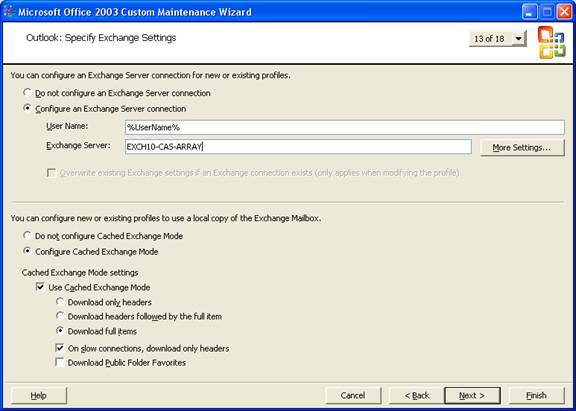
1) Creating Outlook Profile File (PRF) using Microsoft Office Resource Kit with required changes for New Mailbox Server, where new mailbox server will be the NLB FQDN of Exchange 2010 CAS Servers.
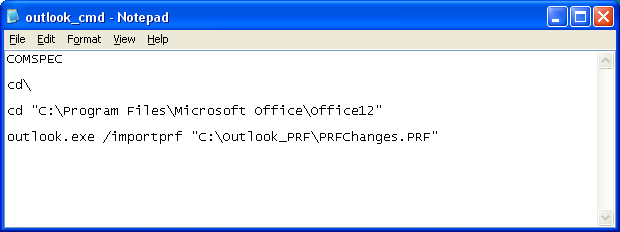
2) Creating a script, which will execute the above created “Outlook Profile File (PRF)” on the login mode of users, which will be moving from old Exchange Server to New Exchange 2010 Server.
With the above specified workaround, there will be no need to manually changing the Exchange Server name in the Outlook 2003, for the users which will be migrating from old Exchange Server to new Exchange 2010 Server.
| Microsoft Office Resource Kit – Creating Outlook Profile File (PRF) for changing Exchange Server Name | |
|
Cheers!
Zahir hussain Shah
 Azure Hybrid & Cloud Migration Blog
Leave a comment