Article by: Zahir Hussain Shah
Today I ran into a situation where our remote site server got unexpected shutdown numerous times, due to the power outage happening on the remote site, so after long time when the server came up, and I saw that DHCP Server is not working, so I tried to start the service, but it said same as in the below snapshot:
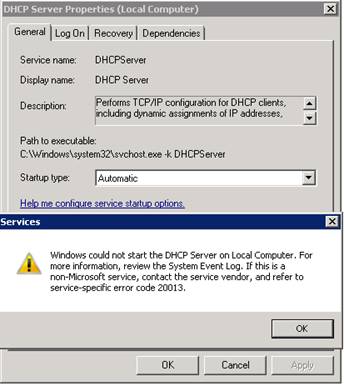
Caused:
The primary cause of this problem is that when there are many unexpected shutdown happens so the DHCP Server database gets corrupted, and in the event if you try to remove the DHCP Server role from the Server and add it again, it does not delete the DHCP Server Directory from %Windows%System32DHCP”, so when you add the role again, it has the same corrupted database, which never lets the DHCP Server Service to start by anyhow.
Note:
This solution assumes that you have already taken DHCP Server Backup using “netsh dhcp server export “C:dhcpserverbackup.dat”.
If you don’t have your DHCP Server backup, so when you will apply this solution, you have to recreate the scope and other DHCP Server Configuration.
Solution:
1) Go to C:WindowsSystem32 and find the “DHCP” folder and first make a copy somewhere on the hard disk and then go inside the DHCP folder and remove all the contents from the directory.
2) Go to services snap-in and try to restart the service, you will see the service will come up in a timely fashion.
3) If you have already taken the backup using “netsh dhcp server export “C:dhcpserverbackup.dat”, then import the backup using “netsh dhcp server import “C:dhcpserverbackup.dat”.
Applies to:
Windows Server 2000
Windows Server 2003 (SP1/SP2/R2)
Windows Server 2008 (SP1/SP2/R2)
If you don’t have the backup, then configure the scope option and your DHCP Server is back :) Although if you don’t have backup, then I would say “something to have better than nothing” :)
I hope this article will help many of you who runs into the same kind of situation, where you DHCP Server is almost dead, and someone of you first will be trying to reinstall the server, but this article may help to save your time to reinstall the OS.
Cheers!
Zahir Hussain Shah
Infrastructure Practice Consultant – Unified Communications
MCSE, MCTS, MCTIP Enterprise Administrator, CCNA, ITIL
Blog: http://zahirshahblog.com | LinkedIn | Twitter
 Azure Hybrid & Cloud Migration Blog
Leave a comment