Exchange 2010 feature called Database Availability Group (DAG) is the new High Availability feature of Exchange 2010.
DRP Design
In both the production site and the Disaster Recovery site we need a server with Windows Enterprise edition since DAG relies on Microsoft Failover Clustering which is only available in the Enterprise edition. Both sites need a Domain Controller and a GC role. The DR site will be in a different Active directory Site so that users want log in to it
Installing
Installing Standard installation of Exchange 2010 edition on Windows 2008 R2 Enterprise that includes HAB,CAS,Mailbox – Roles. configuring all the basic configuration simillar on both servers and testing sending and reciving mail.
Creating a DAG.
In the Exchange Management Console
- Expand Organization Configuration.
- Click Mailbox.
- In the middle pane, click the Database Availability Group tab.
- In the right control pane click "New Database Availability Group".
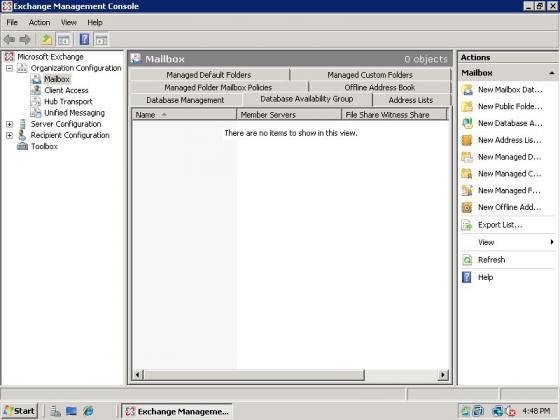
The Create a DAG wizard starts.
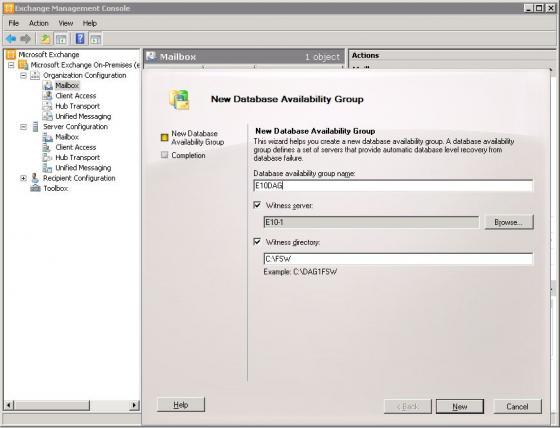
Enter a name for your DAG. If you have a server with a HUB role but no mailbox role, then the wizard will select the HUB server and create the witness directory for you. If you don’t have an available HUB server, then you must manually specify the ‘Witness Server’ and a ‘Witness Directory’.
For macking sure that we want have permission problams with the Witness share directory add the ‘Exchange Trusted subsystem’ group to the witness server local administrators group. This is also necessary becasue in order to create a DAG you must also create a computer account in Active Directory. You might need to delegate ‘Exchange Trusted subsystem’ group to create and manage the computer account in Active Directory.
EMS Command for creating the DAG
We can also create the DAG with a Power Shall command instead of the GUI process –
New-DatabaseAvailabilityGroup -Name E10DAG -WitnessDirectory C:DAG1 -WitnessServer FQDNofaServerinPrimarySite -DatabaseAvailabilityGroupIpAddresses 192.168.15.233,192.168.25.233 -Verbose
| with the Wizard you cannot set a fixed IP on your DAG. Instead, it will use DHCP to assign an IP. This is important to consider since it is recommended that you have an IP in every subnet that contains DAG members. |
The next step is to add your Exchange mailbox servers to your DAG
Right Click ‘Manage Database Availability Group Membership’ and then add the mailbox servers to it.
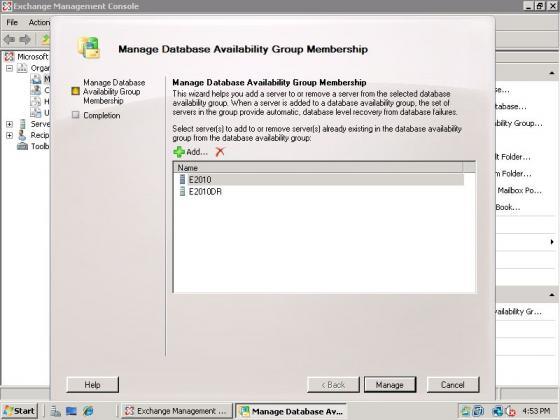
the Failover Cluster role will be installed on the servers you added to your DAG.
EMS Command For adding an Exchange server to DAG
Add-DatabaseAvailabilityGroupServer -Identity E10DAG -MailboxServer FQDNofMailboxServer -Verbose
The next step is to add databases to your DAG members in order to enable replication.
- Return to Exchange Management Console and expand Organization Configuration.
- Click Mailbox. In the middle pane, click the Database Management tab.
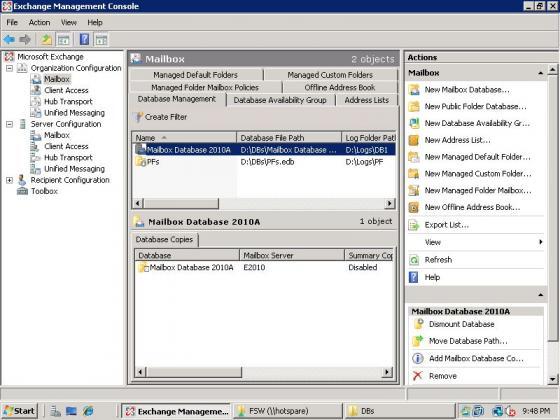
- In the lower pane, right-click the database you wish to replicate within the DAG.
- Choose Add Mailbox Database Copy.
- When the wizard launches, browse for the server in the DAG to which you want to replicate the mailbox database. Pick a Replay lag time and a truncation lag time.
EMS Command For adding a Database to replication
Add-MailboxDatabaseCopy -Identity ‘Mailbox Database 2010A’ -MailboxServer FQDNofServerInDRSite -ActivationPreference 2
| This step can potentially take a long time since the database is seeded to the DR site,the amount of time it takes depends on the database size and available bandwidth.
Set the ActivationPreference on all the Databases to 1 on the server in the production site; then, set the database copy on the server in the Disaster Recovery site to ‘suspended’ for activation. |
Now we must set some parameters on the mailbox database so that it is not automatically activated.
EMS Command
Suspend-MailboxDatabaseCopy -Identity ‘Mailbox Database 2010AFQDNofServerInDRSite’ -ActivationOnly -Verbose
Configuring Replay Lag Time
Configuring Replay Lag time is something that you should seriously consider doing. Lag time is how long the passive copy will wait until the transaction log is replayed into the database. Replication is still happening as fast as possible.
EMS command
Set-MailboxDatabaseCopy -Identity ‘mailbox database 2010AFQDNofServerInDRSite’ -ReplayLagTime 0.1:0:0 -Verbose
There is also another paratemeter that you might want to use–the Truncation Lag Time.
EMS command
Set-MailboxDatabaseCopy -Identity ‘mailbox database 1976375852FQDNofServerInDRSite’ -TruncationLagTime 0.1:0:0
| Please note: 0.1:0:0 means 1 hour |
How long you set the ReplayLagTime and TruncationLogTime for depends on two things
- How long it takes you to notice a corruption on the production site.
- How long it takes to replay all transaction log files if you activate the DR site.
Creating the CASArray
New-ClientAccessArray -Name CASArray-HQ -Fqdn FQDNofYourDesiredEndpoint -Site ADsiteInPrimaryDatacenter
Now configure all your databases to have the CASArray-HQ object as the RPCClientAccessServer. This will ensure that Outlook conencts to CASArray FQDN instead of the actual server name.
Get-MailboxDatabase | Set-MailboxDatabase -RpcClientAccessServer CASArray-HQ
You must also create a record in DNS with FQDNofYourDesiredEndpoint with an IP of your Exchange server in the primary datacenter. Set the TTL to a low value, such as 5 minutes, to make the switchover go faster to the Disaster Recover sit
 Azure Hybrid & Cloud Migration Blog
Leave a comment