Hi Folks,
Just before couple of days ago, I got one request from my customer that they have photocopier and scanners machine, which synchs with AD, and on these Photo Copier / Scanner machines, they have to configure SMTP SERVER for sending notification and scanned images to users, but after creating a USER / MAILBOX in Exchange 2010, whenever they try to send a test email from these Photo Copier / Scanner machine or WEB CONSOLE, it gets failed.
So finally, when I looked into the Exchange to enable these machines to take advantage, and relay the customer’s Exchange 2010 for sending these Images and notification to users, so I found the below workaround for fixing this problem:
Environment details:
2 Server boxes for CAS / HUB Roles installed
2 Server boxes for Mailbox Role Installed
NBL Cluster configured on CAS Servers
CAS ARRAY FQDN: CASNLB.ABC.COM
Solution:
1) Open Exchange 2010 Management Console on CAS 1
2) Expend the SERVER CONFIGURATION working pane
3) Select HUB TRANSPORT and create a RECEIVE CONNECTOR
4) Select Receive Connector type as CUSTOM
5) Give the name of Receive Connector
6) In the Receive Emails from the remote host, you can add the IP ADDRESS or RANGE of a PHOTOCOPIER / SCANNER, to whom you want to allow for relaying using Exchange.
7) Finish
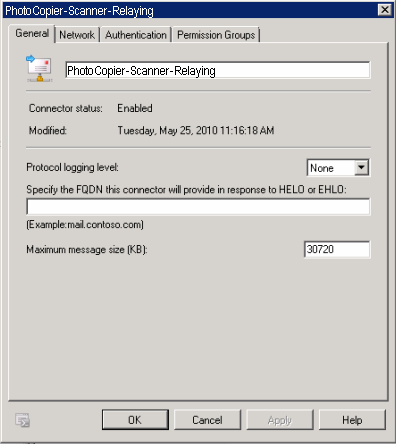
Now we will customize the properties of a receive connector:
In the below image you can see that in the “Receive mail from remote servers” section, you can add all those application and devices, to whom you want to use Exchange for relaying.
NOTE: In the authentication tab, you should uptick the TLS Authentication, and on the PERMISSION tab, you should TICK Anonymous permission for accessing this connector.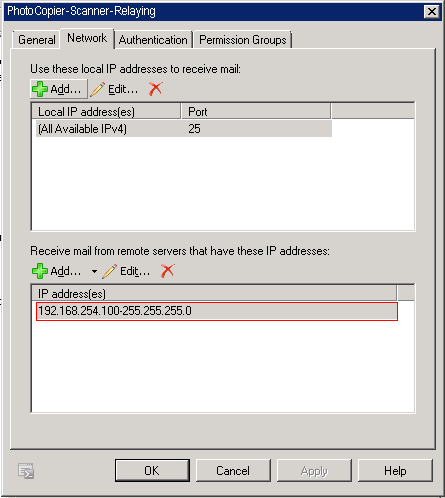
After customizing the connector for removing TLS authentication and giving the permission for Anonymous access, you are ready to use this connector for allowing Relaying through your Exchange 2010 Organization, and as I mentioned in the beginning of this article that in our environment we have TWO CAS / HUB, so repeat the same steps to create the replica connector on the another HUB TRANSPORT SERVER.
Thanks for your visiting, and take a interest to read this article.
Zahir Hussain Shah
 Azure Hybrid & Cloud Migration Blog
Leave a comment